DMS Swagger GUI
NorthBound CPE Management Interface
The Swagger UI provides a user-friendly way to interact with our NorthBound (NB) APIs for CPE (Customer Premises Equipment) management. It allows you to visualize and interact with the API’s resources without needing to understand the underlying implementation logic. This makes it straightforward for both backend implementation and client-side consumption.
Swagger is a powerful tool that simplifies API usage by providing a well-organized interface for developers to explore available endpoints and test them. Below, you'll find essential details on how to make the most of our Swagger-based NB API documentation.
Swagger GUI URL: https://your_ACS/v1/doc
OpenAPI URL: https://your_ACS/v1/doc/swagger.json
Understanding Swagger:
- Swagger is an open-source framework for designing, building, and documenting RESTful APIs.
- It simplifies API development and usage by providing a clean and interactive interface.
- Developers can explore available endpoints, send requests, and view responses, making it an invaluable tool for API integration.
- Our Swagger-based documentation empowers you to efficiently manage and interact with your CPEs through NB APIs.
Explore our API documentation, test endpoints, and streamline your CPE management with Swagger!
Accessing Swagger
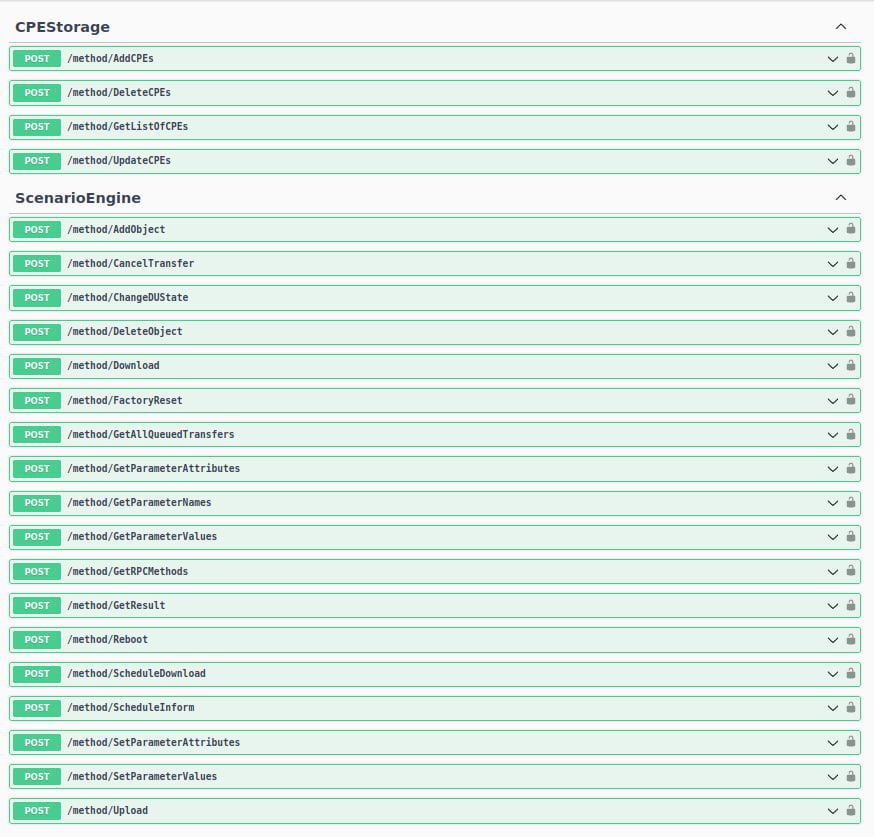
To access the Swagger GUI, use the provided Swagger GUI URL in your web browser. This interface offers a comprehensive overview of the available endpoints, request parameters, and response structures.
Interacting with Endpoints

Swagger allows you to interact with various endpoints, such as the "GetParameterValues" example shown below:
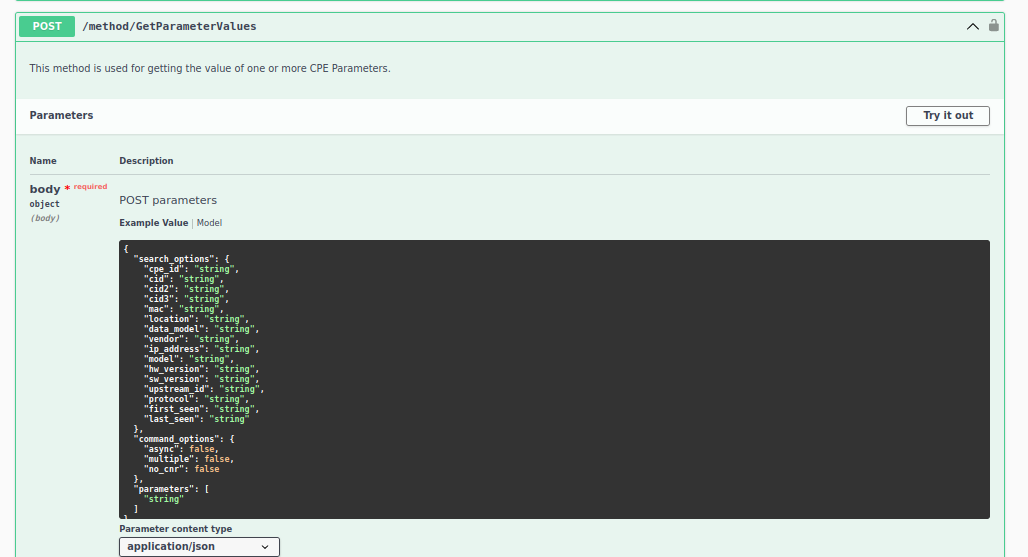
- To test an endpoint, select the "Try it out" button.
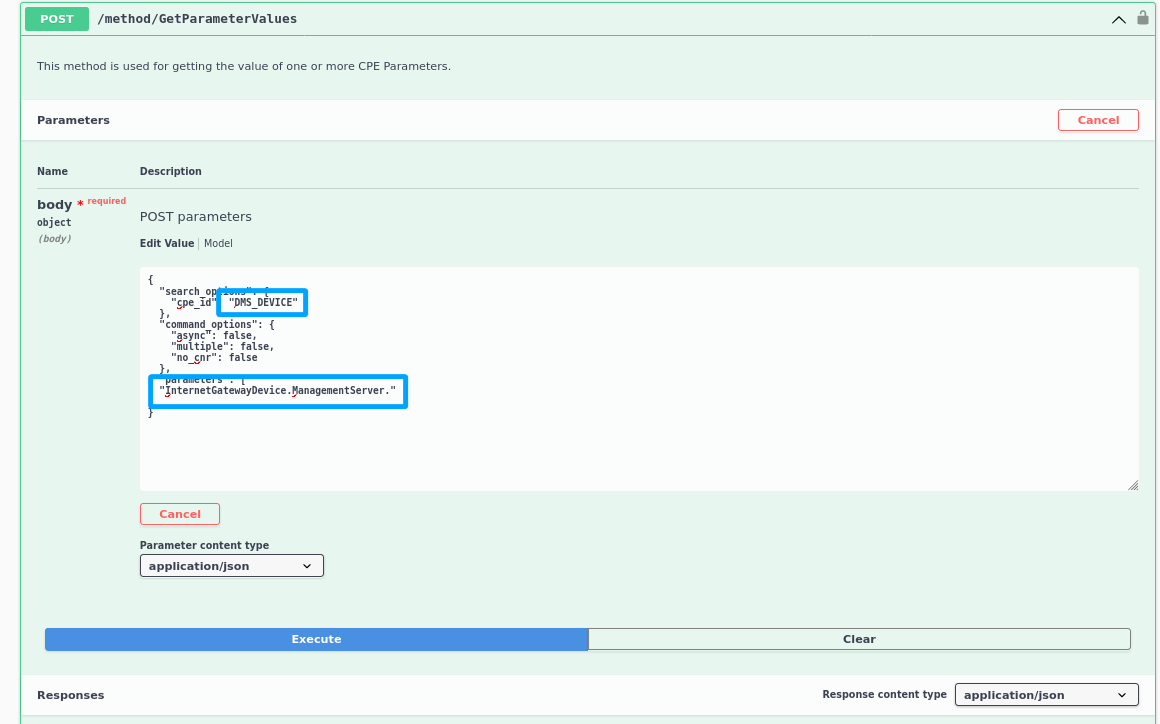
- Modify the
cpe_idparameter with the CPE's serial number value. - Add a list of CWMP requested parameters, which can include full or partial CWMP paths.
Viewing API Responses
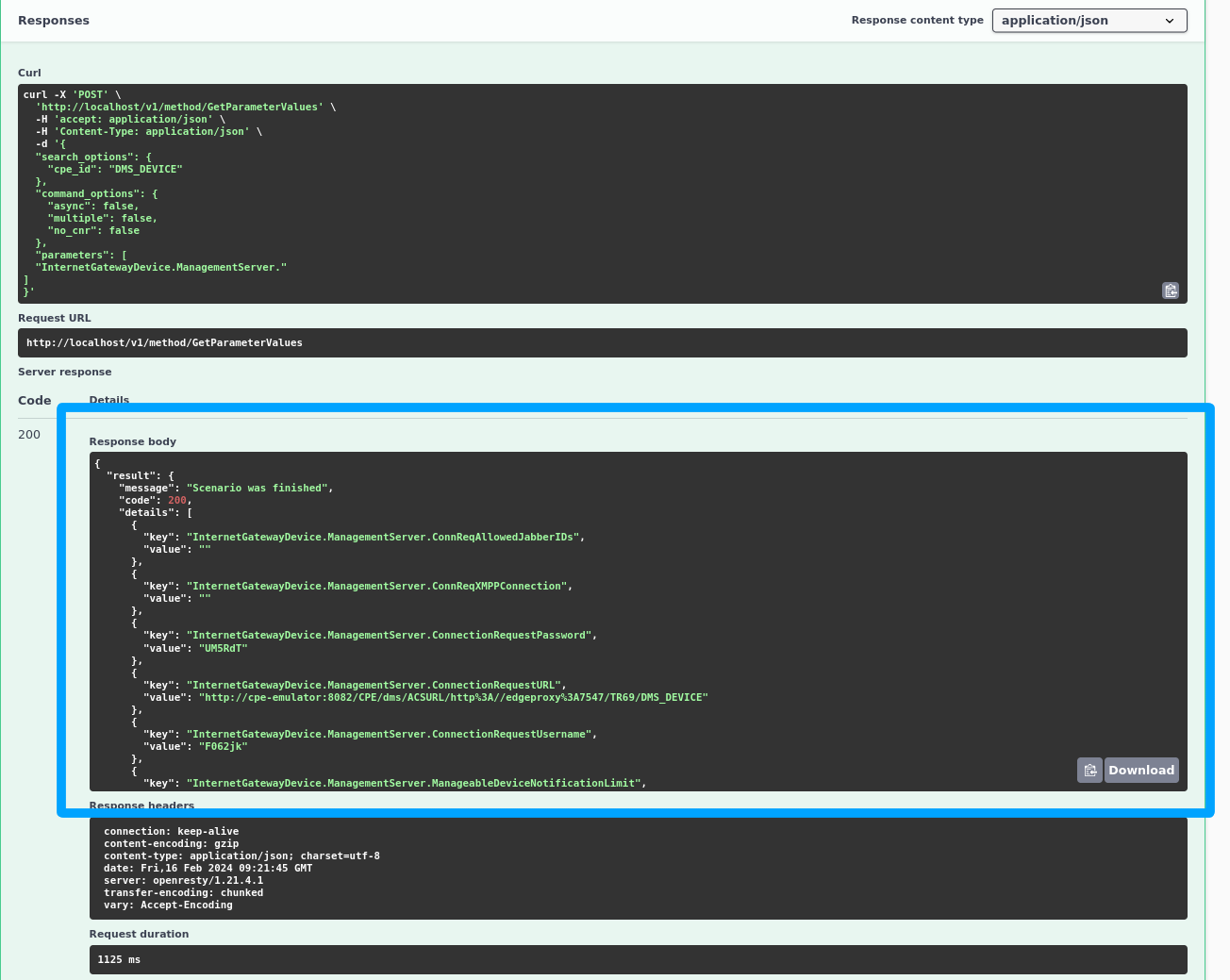
After executing a request, Swagger displays the response, allowing you to view the values read from the CPE. The response body provides valuable data for further analysis or integration into your systems.
Generated requests and authorization
If you want to use any of the further presented examples you'll need to manually add your DMS credentials (login, password) into your cURL commands as follows:
-u login:password \
Said cURLs should look like that:
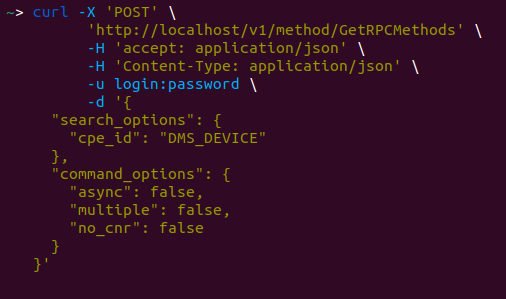
Otherwise, generated cURL commands will return "Error 401 Access Denied" when executed.
Next will be a section with all presented methods grouped by their mutual functionality.
Scenario Service
Methods for direct CPE interaction.
Common arguments:
"search_options":
- "cpe_id": "string"; CPE Serial number
- "cid": "string"; Reserved field for custom identificator of CPE - for example, customer ID, login, customer account number, depending on your use cases
- "cid2": "string"; Reserved field for custom identificator of CPE - for example, customer ID, login, customer account number, depending on your use cases
- "cid3": "string"; Reserved field for custom identificator of CPE - for example, customer ID, login, customer account number, depending on your use cases
- "mac": "string"; CPE device mac address
- "location": "string"; CPE device location identifier
- "data_model": "string"; Data model that is used by CPE device
- "vendor": "string"; Company that manufacturing or selling device
- "ip_address": "string"; CPE device IP address
- "model": "string"; CPE device model
- "hw_version": "string"; Hardware version of CPE device
- "sw_version": "string"; Version of firmware installed on CPE device
- "upstream_id": "string"; Serial number of device that has higher hierarchy in network relation
- "protocol": "string"; Name of the protocol that is used by CPE device
- "first_seen": "int" or "string" First time the CPE device interacted with ACS presented as unix timestamp; can be given as an integer int or as a string using comparison operators with the following structure: ">int", "<int", "!int"
- "last_seen": "int" or "string" Last time the CPE device interacted with ACS presented as unix timestamp; can be given as an integer int or as a string using comparison operators with the following structure: ">int", "<int", "!int"
"command_options":
-
"async": boolean;
- true - run scenario, don't wait for response, return task ID. For example of usage see Asynchronous Scenario. Use task ID (env_id) in method GetResult
- false (default) - run scenario, wait for response, return scenario result
-
"no_cnr": boolean;
- true - don't send Connection Request
- false (default) - send Connection Request
-
"multiple": boolean;
- true - If multiple CPEs are found, run scenario on all of them
- false (default) - check for only one CPE
Default run Scenario schema:
CPE - Customer Premises Equipment
ACS - Automatic Configuration Server
OSS - Operation Support System
Common Response Parameters:
- 200 - OK
{
    "result": {
        "message": "string",
        "code": 200,
        "env_id": "string",
        "details": [
            {
                "key": "string",
                "value": "value of any type"
            }
        ]
    }
}
- 400 - Bad Request
{
    "error": "string"
}
- 401 - Authentication is missing or invalid
- 500 - Internal Server Error
{
    "error": "string"
}
Method-specific parameters:
GetParameterValues
POST /method/GetParameterValues
This method is used for getting the value of one or more CPE Parameters.
Request parameters:
{
    "search_options": {
        "cpe_id": "string"
    },
    "command_options": {
        "async": false,
        "no_cnr": false
    },
    "parameters": [ # A list of TR-069 parameters to request values of
        "String"
    ]
}
Response Parameters:
{
    "result": {
        "message": "string",
        "code": 200,
        "env_id": "string",
        "details": [
            {
                "key": "string", # TR-069 key
                "value": "value of any type" # value of corresponding key
            }
        ]
    }
}
Example:
Request
endpoint: POST http://127.0.0.1/v1/method/GetParameterValues
headers:
  User-Agent: python-requests/2.31.0
  Accept-Encoding: gzip, deflate
  Accept: */*
  Connection: keep-alive
  Content-Length: 126
  Content-Type: application/json
body:
  {
    "search_options": {
      "cpe_id": "DMS_DEVICE"
    },
    "command_options": {},
    "parameters": [
      "InternetGatewayDevice.ManagementServer."
    ]
  }
Response
status_code: 200
headers:
  Server: openresty/1.21.4.1
  Date: Mon, 29 Jan 2024 09:02:48 GMT
  Content-Type: application/json
  Content-Length: 1412
  Connection: keep-alive
body:
  {
    "result": {
      "code": 200,
      "message": "Scenario was finished",
      "details": [
        {
          "key": "InternetGatewayDevice.ManagementServer.ConnReqAllowedJabberIDs",
          "value": ""
        },
        {
          "key": "InternetGatewayDevice.ManagementServer.ConnReqXMPPConnection",
          "value": ""
        },
        {
          "key": "InternetGatewayDevice.ManagementServer.ConnectionRequestPassword",
          "value": ""
        },
        {
          "key": "InternetGatewayDevice.ManagementServer.ConnectionRequestURL",
          "value": "http://cpe-emulator:8082/CPE/dms/ACSURL/http%3A//edgeproxy%3A7547/TR69/DMS_DEVICE"
        },
        {
          "key": "InternetGatewayDevice.ManagementServer.ConnectionRequestUsername",
          "value": "XsTI2F"
        },
        {
          "key": "InternetGatewayDevice.ManagementServer.ManageableDeviceNotificationLimit",
          "value": 15
        },
        {
          "key": "InternetGatewayDevice.ManagementServer.ManageableDeviceNumberOfEntries",
          "value": 0
        },
        {
          "key": "InternetGatewayDevice.ManagementServer.ParameterKey",
          "value": ""
        },
        {
          "key": "InternetGatewayDevice.ManagementServer.Password",
          "value": ""
        },
        {
          "key": "InternetGatewayDevice.ManagementServer.PeriodicInformEnable",
          "value": true
        },
        {
          "key": "InternetGatewayDevice.ManagementServer.PeriodicInformInterval",
          "value": 86400
        },
        {
          "key": "InternetGatewayDevice.ManagementServer.PeriodicInformTime",
          "value": [
            1,
            1,
            1,
            0,
            0,
            0
          ]
        },
        {
          "key": "InternetGatewayDevice.ManagementServer.URL",
          "value": "http://edgeproxy:7547"
        },
        {
          "key": "InternetGatewayDevice.ManagementServer.UpgradesManaged",
          "value": false
        },
        {
          "key": "InternetGatewayDevice.ManagementServer.Username",
          "value": "usr0p3nf1b3r"
        }
      ]
    }
  }
SetParameterAttributes
POST /method/SetParameterAttributes
This method is used for modification the attributes of one or more CPE Parameters.
Request parameters:
{
    "search_options": {
        "cpe_id": "string"
    },
    "command_options": {
        "async": false,
        "no_cnr": false
    },
    "parameters": [
        {
            "Name": "string", # A name of TR-069 parameter
            "NotificationChange": true, # change Notification
            "Notification": 0, # Notification mode
            "AccessListChange": true, # change Access Mode
            "AccessList": [ # list of Access Modes
                "string"
            ]
        }
    ]
}
Access modes:
- “Subscriber”: Indicates write access by an interface controlled on the subscriber LAN. Includes any and all such LAN-side mechanisms, which MAY include but are not limited to TR-064 (LAN-side DSL CPE Configuration Protocol), UPnP, the device’s user interface, client-side telnet, and client-side SNMP.
Notification modes:
- 0: Notification off. The CPE need not inform the ACS of a change to the specified Parameter(s).
- 1: Passive notification. Whenever the specified Parameter value changes, the CPE MUST include the new value in the ParameterList in the Non-HEARTBEAT Inform message that is sent the next time a Session is established to the ACS.
- 2: Active notification. Whenever the specified Parameter value changes, the CPE MUST initiate a Session to the ACS, and include the new value in the ParameterList in the associated Inform message.
- 3: Passive lightweight notification. Whenever the specified Parameter value changes, the CPE MUST include the new value in the ParameterList in the next Lightweight Notification message that is sent.
- 4: Passive notification with passive lightweight notification. This combines the requirements of the values 1 (Passive notification) and 3 (Passive lightweight notification). The two mechanisms operate independently.
- 5: Active lightweight notification. Whenever the specified Parameter value changes, the CPE MUST include the new value in the ParameterList in the associated Lightweight Notification message and send that message.
- 6: Passive notification with active lightweight notification. This combines the requirements of the values 1 (Passive notification) and 5 (Active lightweight notification). The two mechanisms operate independently.
Example:
Request
endpoint: POST http://127.0.0.1/v1/method/SetParameterAttributes
headers:
  User-Agent: python-requests/2.31.0
  Accept-Encoding: gzip, deflate
  Accept: */*
  Connection: keep-alive
  Content-Length: 250
  Content-Type: application/json
body:
  {
    "search_options": {
      "cpe_id": "DMS_DEVICE"
    },
    "command_options": {},
    "parameters": [
      {
        "AccessList": [],
        "Notification": 1,
        "NotificationChange": true,
        "Name": "InternetGatewayDevice.ManagementServer.PeriodicInformInterval",
        "AccessListChange": false
      }
    ]
  }
Response
status_code: 200
headers:
  Server: openresty/1.21.4.1
  Date: Mon, 29 Jan 2024 09:02:49 GMT
  Content-Type: application/json
  Content-Length: 247
  Connection: keep-alive
body:
  {
    "result": {
      "code": 200,
      "message": "Scenario was finished",
      "details": [
        {
          "key": "data",
          "value": [
            {
              "methodName": "SetParameterAttributesResponse",
              "is_response": true,
              "body": {},
              "ID": "3fc89dbd-7744-4d47-8fe0-297df8560dda",
              "cwmpVersion": "",
              "namespace": ""
            }
          ]
        }
      ]
    }
  }
ChangeDUState
POST /method/ChangeDUState
This method MAY be used by an ACS to trigger the explicit state transitions of Install, Update, and Uninstall for a Deployment Unit (DU), i.e. installing a new DU, updating an existing DU, or uninstalling an existing DU.
Request parameters:
{
    "search_options": {
        "cpe_id": "string"
    },
    "command_options": {
        "async": false,
        "no_cnr": false
    },
    "parameters": {
        "Operations": {
            "Install": [
            {
                "URL": "string",
                "UUID": "string",
                "Username": "string",
                "Password": "string",
                "ExecutionEnvRef": "string"
            }
        ],
        "Update": [
            {
                "UUID": "string",
                "Version": "string",
                "URL": "string",
                "Username": "string",
                "Password": "string"
            }
        ],
        "Uninstall": [
            {
                "UUID": "string",
                "Version": "string",
                "ExecutionEnvRef": "string"
            }
        ]
    },
    "CommandKey": "string"
    }
}
Example:
Request
endpoint: POST http://127.0.0.1/v1/method/ChangeDUState
headers:
  User-Agent: python-requests/2.31.0
  Accept-Encoding: gzip, deflate
  Accept: */*
  Connection: keep-alive
  Content-Length: 402
  Content-Type: application/json
body:
  {
    "search_options": {
      "cpe_id": "DMS_DEVICE"
    },
    "command_options": {},
    "parameters": {
      "Operations": {
        "Update": [
          {
            "URL": "http://your.url.com",
            "Username": "",
            "Password": "",
            "Version": "",
            "UUID": ""
          }
        ],
        "Install": [
          {
            "URL": "http://your.url.com",
            "Username": "",
            "Password": "",
            "UUID": "",
            "ExecutionEnvRef": ""
          }
        ],
        "Uninstall": [
          {
            "Version": "sss",
            "UUID": "",
            "ExecutionEnvRef": ""
          }
        ]
      },
      "CommandKey": ""
    }
  }
Response
status_code: 200
headers:
  Server: openresty/1.21.4.1
  Date: Mon, 29 Jan 2024 09:02:51 GMT
  Content-Type: application/json
  Content-Length: 238
  Connection: keep-alive
body:
  {
    "result": {
      "code": 200,
      "message": "Scenario was finished",
      "details": [
        {
          "key": "data",
          "value": [
            {
              "methodName": "ChangeDUStateResponse",
              "is_response": true,
              "body": {},
              "ID": "546e2eeb-068c-4791-bf2b-601e8f765edd",
              "cwmpVersion": "",
              "namespace": ""
            }
          ]
        }
      ]
    }
  }
FactoryReset
POST /method/FactoryReset
This method resets the CPE to its factory default state, and calls for use with extreme caution.
Request parameters:
{
    "search_options": {
        "cpe_id": "string"
    },
    "command_options": {
        "async": false,
        "no_cnr": false
    }
}
Example:
Request
endpoint: POST http://127.0.0.1/v1/method/FactoryReset
headers:
  User-Agent: python-requests/2.31.0
  Accept-Encoding: gzip, deflate
  Accept: */*
  Connection: keep-alive
  Content-Length: 85
  Content-Type: application/json
body:
  {
    "search_options": {
      "cpe_id": "DMS_DEVICE"
    },
    "command_options": {},
    "parameters": {}
  }
Response
status_code: 200
headers:
  Server: openresty/1.21.4.1
  Date: Mon, 29 Jan 2024 09:02:52 GMT
  Content-Type: application/json
  Content-Length: 237
  Connection: keep-alive
body:
  {
    "result": {
      "code": 200,
      "message": "Scenario was finished",
      "details": [
        {
          "key": "data",
          "value": [
            {
              "methodName": "FactoryResetResponse",
              "is_response": true,
              "body": {},
              "ID": "3ebc3799-214f-4690-bff5-e879d6aa45a3",
              "cwmpVersion": "",
              "namespace": ""
            }
          ]
        }
      ]
    }
  }
GetResult
POST /method/GetResult
Method for getting the result of a scenario by env ID. Useful for async operation.
Request parameters:
{
    "env_id": "string", # Scenario ID returned by an RPC method
    "timeout": 0 # Timeout in seconds to get the result
}
Example:
Request
endpoint: POST http://127.0.0.1/v1/method/GetResult
headers:
  User-Agent: python-requests/2.31.0
  Accept-Encoding: gzip, deflate
  Accept: */*
  Connection: keep-alive
  Content-Length: 57
  Content-Type: application/json
body:
  {
    "env_id": "00000-OOOOOOO-0000000-OOOOOOO",
    "timeout": 5
  }
Response
status_code: 200
headers:
  Server: openresty/1.21.4.1
  Date: Mon, 29 Jan 2024 09:03:38 GMT
  Content-Type: application/json
  Content-Length: 56
  Connection: keep-alive
body:
  {
    "result": {
      "code": 204,
      "message": "Polling time is over"
    }
  }
DeleteObject
POST /method/DeleteObject
This method is used by an ACS to delete an instance of a Multi-Instance Object.
Request parameters:
{
    "search_options": {
        "cpe_id": "string"
    },
    "command_options": {
        "async": false,
        "no_cnr": false
    },
    "parameters": {
        "ObjectName": "string",
        "ParameterKey": "string"
    }
}
Example:
Request
endpoint: POST http://127.0.0.1/v1/method/DeleteObject
headers:
  User-Agent: python-requests/2.31.0
  Accept-Encoding: gzip, deflate
  Accept: */*
  Connection: keep-alive
  Content-Length: 196
  Content-Type: application/json
body:
  {
    "search_options": {
      "cpe_id": "DMS_DEVICE"
    },
    "command_options": {},
    "parameters": {
      "ObjectName": "InternetGatewayDevice.WANDevice.1.WANConnectionDevice.1.WANPPPConnection.2.",
      "ParameterKey": ""
    }
  }
Response
status_code: 200
headers:
  Server: openresty/1.21.4.1
  Date: Mon, 29 Jan 2024 09:02:53 GMT
  Content-Type: application/json
  Content-Length: 96
  Connection: keep-alive
body:
  {
    "result": {
      "code": 200,
      "message": "Scenario was finished",
      "details": [
        {
          "key": "Status",
          "value": 0
        }
      ]
    }
  }
AddObject
POST /method/AddObject
This method is used by an ACS to create a new instance of a Multi-Instance Object.
Request parameters:
{
    "search_options": {
        "cpe_id": "string"
    },
    "command_options": {
        "async": false,
        "no_cnr": false
    },
    "parameters": {
        "ObjectName": "string",
        "ParameterKey": "string"
    }
}
Example:
Request
endpoint: POST http://127.0.0.1/v1/method/AddObject
headers:
  User-Agent: python-requests/2.31.0
  Accept-Encoding: gzip, deflate
  Accept: */*
  Connection: keep-alive
  Content-Length: 194
  Content-Type: application/json
body:
  {
    "search_options": {
      "cpe_id": "DMS_DEVICE"
    },
    "command_options": {},
    "parameters": {
      "ObjectName": "InternetGatewayDevice.WANDevice.1.WANConnectionDevice.1.WANPPPConnection.",
      "ParameterKey": ""
    }
  }
Response
status_code: 200
headers:
  Server: openresty/1.21.4.1
  Date: Mon, 29 Jan 2024 09:02:54 GMT
  Content-Type: application/json
  Content-Length: 131
  Connection: keep-alive
body:
  {
    "result": {
      "code": 200,
      "message": "Scenario was finished",
      "details": [
        {
          "key": "InstanceNumber",
          "value": 2
        },
        {
          "key": "Status",
          "value": 0
        }
      ]
    }
  }
ScheduleDownload
POST /method/ScheduleDownload
This method MAY be used by the ACS to cause the CPE to download a specified file from the designated location and apply it within either one or two specified time windows.
Request parameters:
{
    "search_options": {
        "cpe_id": "string"
    },
    "command_options": {
        "async": false,
        "no_cnr": false
    },
    "parameters": {
        "CommandKey": "string",
        "FileType": "1 Firmware Upgrade Image",
        "URL": "string",
        "Username": "string",
        "Password": "string",
        "FileSize": 0,
        "TargetFileName": "string",
        "TimeWindowList": [
            {
                "WindowStart": 0,
                "WindowEnd": 0,
                "WindowMode": "3 When Idle",
                "UserMessage": "string",
                "MaxRetries": 0
            }
        ]
    }
}
Example:
Request
endpoint: POST http://127.0.0.1/v1/method/ScheduleDownload
headers:
  User-Agent: python-requests/2.31.0
  Accept-Encoding: gzip, deflate
  Accept: */*
  Connection: keep-alive
  Content-Length: 366
  Content-Type: application/json
body:
  {
    "search_options": {
      "cpe_id": "DMS_DEVICE"
    },
    "command_options": {},
    "parameters": {
      "Username": "",
      "URL": "http://your.url.com",
      "TargetFileName": "",
      "FileType": "1 Firmware Upgrade Image",
      "FileSize": 200,
      "TimeWindowList": [
        {
          "WindowMode": "1 At Any Time",
          "WindowEnd": 0,
          "WindowStart": 0,
          "MaxRetries": -1,
          "UserMessage": ""
        }
      ],
      "Password": "",
      "CommandKey": ""
    }
  }
Response
status_code: 200
headers:
  Server: openresty/1.21.4.1
  Date: Mon, 29 Jan 2024 09:02:55 GMT
  Content-Type: application/json
  Content-Length: 316
  Connection: keep-alive
body:
  {
    "result": {
      "code": 200,
      "message": "Scenario was finished",
      "details": [
        {
          "key": "data",
          "value": [
            {
              "methodName": "DownloadResponse",
              "is_response": true,
              "body": {
                "Status": 1,
                "StartTime": "0001-01-01T00:00:00Z",
                "CompleteTime": "0001-01-01T00:00:00Z"
              },
              "ID": "c2baae8d-b310-40c1-95a8-23c115763425",
              "cwmpVersion": "",
              "namespace": ""
            }
          ]
        }
      ]
    }
  }
Reboot
POST /method/Reboot
This method causes the CPE to reboot, and calls for use with extreme caution.
Request parameters:
{
    "search_options": {
        "cpe_id": "string"
    },
    "command_options": {
        "async": false,
        "no_cnr": false
    },
    "parameters": "string" # Reboot description string
}
Example:
Request
endpoint: POST http://127.0.0.1/v1/method/Reboot
headers:
  User-Agent: python-requests/2.31.0
  Accept-Encoding: gzip, deflate
  Accept: */*
  Connection: keep-alive
  Content-Length: 96
  Content-Type: application/json
body:
  {
    "search_options": {
      "cpe_id": "DMS_DEVICE"
    },
    "command_options": {},
    "parameters": "RebootByDMS"
  }
Response
status_code: 200
headers:
  Server: openresty/1.21.4.1
  Date: Mon, 29 Jan 2024 09:02:56 GMT
  Content-Type: application/json
  Content-Length: 231
  Connection: keep-alive
body:
  {
    "result": {
      "code": 200,
      "message": "Scenario was finished",
      "details": [
        {
          "key": "data",
          "value": [
            {
              "methodName": "RebootResponse",
              "is_response": true,
              "body": {},
              "ID": "ee56d5b4-8bbb-4219-b2dd-cf056472a06f",
              "cwmpVersion": "",
              "namespace": ""
            }
          ]
        }
      ]
    }
  }
SetParameterValues
POST /method/SetParameterValues
This method is used for modifying the value of one or more CPE Parameters.
Request parameters:
{
    "search_options": {
        "cpe_id": "string"
    },
    "command_options": {
        "async": false,
        "no_cnr": false
    },
    "parameters": [
        {
            "Name": "string",
            "Value": "value of any type",
            "Type": "string"
        }
    ]
}
Example:
Request
endpoint: POST http://127.0.0.1/v1/method/SetParameterValues
headers:
  User-Agent: python-requests/2.31.0
  Accept-Encoding: gzip, deflate
  Accept: */*
  Connection: keep-alive
  Content-Length: 183
  Content-Type: application/json
body:
  {
    "search_options": {
      "cpe_id": "DMS_DEVICE"
    },
    "command_options": {},
    "parameters": [
      {
        "Name": "InternetGatewayDevice.ManagementServer.ParameterKey",
        "Value": "test",
        "Type": "string"
      }
    ]
  }
Response
status_code: 200
headers:
  Server: openresty/1.21.4.1
  Date: Mon, 29 Jan 2024 09:02:57 GMT
  Content-Type: application/json
  Content-Length: 96
  Connection: keep-alive
body:
  {
    "result": {
      "code": 200,
      "message": "Scenario was finished",
      "details": [
        {
          "key": "Status",
          "value": 1
        }
      ]
    }
  }
SmartSPV
POST /method/SmartSPV
This method is used for modifying the value of one or more CPE Parameters instead of standard SetParameterValues. If the modifying by SetParameterValues was unsuccessful, you can use this method. In this method parameters are set one by one, and if necessary, the boolean values are changes to integer.
Request parameters:
{
    "search_options": {
        "cpe_id": "string"
    },
    "command_options": {
        "async": false,
        "no_cnr": false
    },
    "parameters": [
        {
            "Name": "string",
            "Value": "value of any type",
            "Type": "string"
        }
    ]
}
Example:
Request
endpoint: POST http://127.0.0.1/v1/method/SmartSPV
headers:
  User-Agent: python-requests/2.31.0
  Accept-Encoding: gzip, deflate
  Accept: */*
  Connection: keep-alive
  Content-Length: 296
  Content-Type: application/json
body:
  {
  "search_options": {
    "cpe_id": "DMS_DEVICE"
  },
  "command_options": {
    "async": false,
    "timeout": 300,
    "multiple": false,
    "no_cnr": false
  },
  "parameters": [
    {
      "Name": "InternetGatewayDevice.ManagementServer.PeriodicInformEnable",
      "Value": 1
    }
  ]
}
Response
status_code: 200
headers:
  Server: openresty/1.21.4.1
  Date: Wed, 24 Jul 2024 08:23:48 GMT
  Content-Type: application/json
  Content-Length: 575
  Connection: keep-alive
body:
  {
  "result": {
    "code": 200,
    "message": "Scenario was finished",
    "details": [
      {
        "key": "code",
        "value": 200
      },
      {
        "key": "message",
        "value": "Success"
      },
      {
        "key": "applied_params",
        "value": [
          {
            "param": {
              "ParameterKey": "Update parameters",
              "ParameterList": [
                {
                  "Name": "InternetGatewayDevice.ManagementServer.PeriodicInformEnable",
                  "Value": 1,
                  "Type": "None"
                }
              ]
            },
            "message": "SPV response with status 1",
            "lastResult": [
              {
                "methodName": "SetParameterValuesResponse",
                "is_response": true,
                "body": {
                  "Status": 1
                },
                "ID": "069b409f-2f1c-4f41-b720-eaab3e28a0eb",
                "cwmpVersion": "",
                "namespace": ""
              }
            ]
          }
        ]
      },
      {
        "key": "failed_params",
        "value": []
      }
    ]
  }
}
CancelTransfer
POST /method/CancelTransfer
This method MAY be used by the ACS to cause the CPE to cancel a file transfer initiated by an earlier Download, ScheduleDownload, or Upload method call.
Request parameters:
{
    "search_options": {
        "cpe_id": "string"
    },
    "command_options": {
        "async": false,
        "no_cnr": false
    },
    "parameters": "string"
}
Example:
Request
endpoint: POST http://127.0.0.1/v1/method/CancelTransfer
headers:
  User-Agent: python-requests/2.31.0
  Accept-Encoding: gzip, deflate
  Accept: */*
  Connection: keep-alive
  Content-Length: 95
  Content-Type: application/json
body:
  {
    "search_options": {
      "cpe_id": "DMS_DEVICE"
    },
    "command_options": {},
    "parameters": "CommandKey"
  }
Response
status_code: 200
headers:
  Server: openresty/1.21.4.1
  Date: Mon, 29 Jan 2024 09:02:58 GMT
  Content-Type: application/json
  Content-Length: 239
  Connection: keep-alive
body:
  {
    "result": {
      "code": 200,
      "message": "Scenario was finished",
      "details": [
        {
          "key": "data",
          "value": [
            {
              "methodName": "CancelTransferResponse",
              "is_response": true,
              "body": {},
              "ID": "2e0118c7-2289-41e8-8154-250bcc57aa7b",
              "cwmpVersion": "",
              "namespace": ""
            }
          ]
        }
      ]
    }
  }
GetParameterAttributes
POST /method/GetParameterAttributes
This method is used for getting the attributes of one or more CPE Parameters.
Request parameters:
{
    "search_options": {
        "cpe_id": "string"
    },
    "command_options": {
        "async": false,
        "no_cnr": false
    },
    "parameters": [
        "string"
    ]
}
Example:
Request
endpoint: POST http://127.0.0.1/v1/method/GetParameterAttributes
headers:
  User-Agent: python-requests/2.31.0
  Accept-Encoding: gzip, deflate
  Accept: */*
  Connection: keep-alive
  Content-Length: 126
  Content-Type: application/json
body:
  {
    "search_options": {
      "cpe_id": "DMS_DEVICE"
    },
    "command_options": {},
    "parameters": [
      "InternetGatewayDevice.ManagementServer."
    ]
  }
Response
status_code: 200
headers:
  Server: openresty/1.21.4.1
  Date: Mon, 29 Jan 2024 09:02:59 GMT
  Content-Type: application/json
  Content-Length: 1778
  Connection: keep-alive
body:
  {
    "result": {
      "code": 200,
      "message": "Scenario was finished",
      "details": [
        {
          "key": "InternetGatewayDevice.ManagementServer.ConnReqAllowedJabberIDs",
          "value": {
            "Notification": 0,
            "AccessList": null
          }
        },
        {
          "key": "InternetGatewayDevice.ManagementServer.ConnReqXMPPConnection",
          "value": {
            "Notification": 0,
            "AccessList": null
          }
        },
        {
          "key": "InternetGatewayDevice.ManagementServer.ConnectionRequestPassword",
          "value": {
            "Notification": 0,
            "AccessList": null
          }
        },
        {
          "key": "InternetGatewayDevice.ManagementServer.ConnectionRequestURL",
          "value": {
            "Notification": 0,
            "AccessList": null
          }
        },
        {
          "key": "InternetGatewayDevice.ManagementServer.ConnectionRequestUsername",
          "value": {
            "Notification": 0,
            "AccessList": null
          }
        },
        {
          "key": "InternetGatewayDevice.ManagementServer.ManageableDeviceNotificationLimit",
          "value": {
            "Notification": 0,
            "AccessList": null
          }
        },
        {
          "key": "InternetGatewayDevice.ManagementServer.ManageableDeviceNumberOfEntries",
          "value": {
            "Notification": 0,
            "AccessList": null
          }
        },
        {
          "key": "InternetGatewayDevice.ManagementServer.ParameterKey",
          "value": {
            "Notification": 0,
            "AccessList": null
          }
        },
        {
          "key": "InternetGatewayDevice.ManagementServer.Password",
          "value": {
            "Notification": 0,
            "AccessList": null
          }
        },
        {
          "key": "InternetGatewayDevice.ManagementServer.PeriodicInformEnable",
          "value": {
            "Notification": 0,
            "AccessList": null
          }
        },
        {
          "key": "InternetGatewayDevice.ManagementServer.PeriodicInformInterval",
          "value": {
            "Notification": 0,
            "AccessList": null
          }
        },
        {
          "key": "InternetGatewayDevice.ManagementServer.PeriodicInformTime",
          "value": {
            "Notification": 0,
            "AccessList": null
          }
        },
        {
          "key": "InternetGatewayDevice.ManagementServer.URL",
          "value": {
            "Notification": 0,
            "AccessList": null
          }
        },
        {
          "key": "InternetGatewayDevice.ManagementServer.UpgradesManaged",
          "value": {
            "Notification": 0,
            "AccessList": null
          }
        },
        {
          "key": "InternetGatewayDevice.ManagementServer.Username",
          "value": {
            "Notification": 0,
            "AccessList": null
          }
        }
      ]
    }
  }
ScheduleInform
POST /method/ScheduleInform
This method MAY be used by an ACS to request the CPE to schedule a one-time Inform method call (separate from its periodic Inform method calls) sometime in the future.
Request parameters:
{
    "search_options": {
        "cpe_id": "string"
    },
    "command_options": {
        "async": false,
        "no_cnr": false
    },
    "parameters": {
        "DelaySeconds": 0,
        "CommandKey": "string"
    }
}
Example:
Request
endpoint: POST http://127.0.0.1/v1/method/ScheduleInform
headers:
  User-Agent: python-requests/2.31.0
  Accept-Encoding: gzip, deflate
  Accept: */*
  Connection: keep-alive
  Content-Length: 125
  Content-Type: application/json
body:
  {
    "search_options": {
      "cpe_id": "DMS_DEVICE"
    },
    "command_options": {},
    "parameters": {
      "DelaySeconds": 20,
      "CommandKey": "Test"
    }
  }
Response
status_code: 200
headers:
  Server: openresty/1.21.4.1
  Date: Mon, 29 Jan 2024 09:03:00 GMT
  Content-Type: application/json
  Content-Length: 239
  Connection: keep-alive
body:
  {
    "result": {
      "code": 200,
      "message": "Scenario was finished",
      "details": [
        {
          "key": "data",
          "value": [
            {
              "methodName": "ScheduleInformResponse",
              "is_response": true,
              "body": {},
              "ID": "01bad1c6-8d96-4e05-a4c7-d76378dbec9f",
              "cwmpVersion": "",
              "namespace": ""
            }
          ]
        }
      ]
    }
  }
Download
POST /method/Download
This method is used by the ACS to cause the CPE to download a specified file from the designated location.
Request parameters:
{
    "search_options": {
        "cpe_id": "string"
    },
    "command_options": {
        "async": false,
        "no_cnr": false
    },
    "parameters": {
        "CommandKey": "string",
        "FileType": "1 Firmware Upgrade Image",
        "URL": "string",
        "Username": "string",
        "Password": "string",
        "FileSize": 0,
        "TargetFileName": "string",
        "DelaySeconds": 0,
        "SuccessURL": "string",
        "FailureURL": "string"
    }
}
Example:
Request
endpoint: POST http://127.0.0.1/v1/method/Download
headers:
  User-Agent: python-requests/2.31.0
  Accept-Encoding: gzip, deflate
  Accept: */*
  Connection: keep-alive
  Content-Length: 297
  Content-Type: application/json
body:
  {
    "search_options": {
      "cpe_id": "DMS_DEVICE"
    },
    "command_options": {},
    "parameters": {
      "Username": "",
      "FailureURL": "",
      "URL": "http://your.url.com",
      "TargetFileName": "",
      "FileType": "1 Firmware Upgrade Image",
      "FileSize": 200,
      "SuccessURL": "",
      "DelaySeconds": 5,
      "Password": "",
      "CommandKey": ""
    }
  }
Response
status_code: 200
headers:
  Server: openresty/1.21.4.1
  Date: Mon, 29 Jan 2024 09:03:20 GMT
  Content-Type: application/json
  Content-Length: 201
  Connection: keep-alive
body:
  {
    "result": {
      "code": 200,
      "message": "Scenario was finished",
      "details": [
        {
          "key": "Status",
          "value": 1
        },
        {
          "key": "StartTime",
          "value": "0001-01-01T00:00:00Z"
        },
        {
          "key": "CompleteTime",
          "value": "0001-01-01T00:00:00Z"
        }
      ]
    }
  }
Upload
POST /method/Upload
This method MAY be used by the ACS to cause the CPE to upload a specified file to the designated location.
Request parameters:
{
    "search_options": {
        "cpe_id": "string"
    },
    "command_options": {
        "async": false,
        "no_cnr": false
    },
    "parameters": {
        "CommandKey": "string",
        "FileType": "2 Vendor Log File",
        "URL": "string",
        "Username": "string",
        "Password": "string",
        "DelaySeconds": 0
    }
}
Example:
Request
endpoint: POST http://127.0.0.1/v1/method/Upload
headers:
  User-Agent: python-requests/2.31.0
  Accept-Encoding: gzip, deflate
  Accept: */*
  Connection: keep-alive
  Content-Length: 233
  Content-Type: application/json
body:
  {
    "search_options": {
      "cpe_id": "DMS_DEVICE"
    },
    "command_options": {},
    "parameters": {
      "Username": "",
      "URL": "http://your.server/cfg3.cfg",
      "CommandKey": "",
      "DelaySeconds": 0,
      "Password": "",
      "FileType": "1 Vendor Configuration File"
    }
  }
Response
status_code: 200
headers:
  Server: openresty/1.21.4.1
  Date: Mon, 29 Jan 2024 09:03:25 GMT
  Content-Type: application/json
  Content-Length: 201
  Connection: keep-alive
body:
  {
    "result": {
      "code": 200,
      "message": "Scenario was finished",
      "details": [
        {
          "key": "Status",
          "value": 1
        },
        {
          "key": "StartTime",
          "value": "0001-01-01T00:00:00Z"
        },
        {
          "key": "CompleteTime",
          "value": "0001-01-01T00:00:00Z"
        }
      ]
    }
  }
GetRPCMethods
POST /method/GetRPCMethods
This method is used for getting RPCs supported by CPE.
Request parameters:
{
    "search_options": {
        "cpe_id": "string"
    },
    "command_options": {
        "async": false,
        "no_cnr": false
    }
}
Example:
Request
endpoint: POST http://127.0.0.1/v1/method/GetRPCMethods
headers:
  User-Agent: python-requests/2.31.0
  Accept-Encoding: gzip, deflate
  Accept: */*
  Connection: keep-alive
  Content-Length: 85
  Content-Type: application/json
body:
  {
    "search_options": {
      "cpe_id": "DMS_DEVICE"
    },
    "command_options": {},
    "parameters": {}
  }
Response
status_code: 200
headers:
  Server: openresty/1.21.4.1
  Date: Thu, 01 Feb 2024 13:03:48 GMT
  Content-Type: application/json
  Content-Length: 269
  Connection: keep-alive
body:
  {
    "result": {
      "code": 200,
      "message": "Scenario was finished",
      "details": [
        {
          "key": "data",
          "value": [
            "GetRPCMethods",
            "SetParameterValues",
            "GetParameterValues",
            "GetParameterNames",
            "SetParameterAttributes",
            "GetParameterAttributes",
            "AddObject",
            "DeleteObject",
            "Reboot",
            "Download"
          ]
        }
      ]
    }
  }
GetParameterNames
POST /method/GetParameterNames
This method is used by an ACS to discover the Parameters accessible on a particular CPE.
Request parameters:
{
    "search_options": {
        "cpe_id": "string"
    },
    "command_options": {
        "async": false,
        "no_cnr": false
    },
    "parameters": {
        "ParameterPath": "string",
        "NextLevel": true
    }
}
Example:
Request
endpoint: POST http://127.0.0.1/v1/method/GetParameterNames
headers:
  User-Agent: python-requests/2.31.0
  Accept-Encoding: gzip, deflate
  Accept: */*
  Connection: keep-alive
  Content-Length: 145
  Content-Type: application/json
body:
  {
    "search_options": {
      "cpe_id": "DMS_DEVICE"
    },
    "command_options": {},
    "parameters": {
      "NextLevel": true,
      "ParameterPath": "InternetGatewayDevice."
    }
  }
Response
status_code: 200
headers:
  Server: openresty/1.21.4.1
  Date: Mon, 29 Jan 2024 09:03:27 GMT
  Content-Type: application/json
  Content-Length: 1501
  Connection: keep-alive
body:
  {
    "result": {
      "code": 200,
      "message": "Scenario was finished",
      "details": [
        {
          "key": "InternetGatewayDevice.DeviceInfo.",
          "value": "1"
        },
        {
          "key": "InternetGatewayDevice.DeviceSummary",
          "value": "1"
        },
        {
          "key": "InternetGatewayDevice.DownloadDiagnostics.",
          "value": "1"
        },
        {
          "key": "InternetGatewayDevice.IPPingDiagnostics.",
          "value": "1"
        },
        {
          "key": "InternetGatewayDevice.LANConfigSecurity.",
          "value": "1"
        },
        {
          "key": "InternetGatewayDevice.LANDevice.",
          "value": "1"
        },
        {
          "key": "InternetGatewayDevice.LANDeviceNumberOfEntries",
          "value": "1"
        },
        {
          "key": "InternetGatewayDevice.Layer2Bridging.",
          "value": "1"
        },
        {
          "key": "InternetGatewayDevice.Layer3Forwarding.",
          "value": "1"
        },
        {
          "key": "InternetGatewayDevice.ManagementServer.",
          "value": "1"
        },
        {
          "key": "InternetGatewayDevice.NSLookupDiagnostics.",
          "value": "1"
        },
        {
          "key": "InternetGatewayDevice.Services.",
          "value": "1"
        },
        {
          "key": "InternetGatewayDevice.Time.",
          "value": "1"
        },
        {
          "key": "InternetGatewayDevice.TraceRouteDiagnostics.",
          "value": "1"
        },
        {
          "key": "InternetGatewayDevice.UDPEchoConfig.",
          "value": "1"
        },
        {
          "key": "InternetGatewayDevice.UDPEchoDiagnostics.",
          "value": "1"
        },
        {
          "key": "InternetGatewayDevice.UPnP.",
          "value": "1"
        },
        {
          "key": "InternetGatewayDevice.UploadDiagnostics.",
          "value": "1"
        },
        {
          "key": "InternetGatewayDevice.User.",
          "value": "1"
        },
        {
          "key": "InternetGatewayDevice.UserInterface.",
          "value": "1"
        },
        {
          "key": "InternetGatewayDevice.UserNumberOfEntries",
          "value": "1"
        },
        {
          "key": "InternetGatewayDevice.WANDevice.",
          "value": "1"
        },
        {
          "key": "InternetGatewayDevice.WANDeviceNumberOfEntries",
          "value": "1"
        },
        {
          "key": "InternetGatewayDevice.WiFi.",
          "value": "1"
        }
      ]
    }
  }
GetAllQueuedTransfers
POST /method/GetAllQueuedTransfers
This method MAY be used by an ACS to determine the status of all queued downloads and uploads, including any that were not specifically requested by the ACS, i.e. autonomous transfers.
Request parameters:
{
    "search_options": {
        "cpe_id": "string"
    },
    "command_options": {
        "async": false,
        "no_cnr": false
    }
}
Example:
Request
endpoint: POST http://127.0.0.1/v1/method/GetAllQueuedTransfers
headers:
  User-Agent: python-requests/2.31.0
  Accept-Encoding: gzip, deflate
  Accept: */*
  Connection: keep-alive
  Content-Length: 85
  Content-Type: application/json
body:
  {
    "search_options": {
      "cpe_id": "DMS_DEVICE"
    },
    "command_options": {},
    "parameters": {}
  }
Response
status_code: 200
headers:
  Server: openresty/1.21.4.1
  Date: Mon, 29 Jan 2024 09:03:28 GMT
  Content-Type: application/json
  Content-Length: 103
  Connection: keep-alive
body:
  {
    "result": {
      "code": 200,
      "message": "Scenario was finished",
      "details": [
        {
          "key": "TransferList",
          "value": []
        }
      ]
    }
  }
GetDHCPObjects
POST /method/GetDhcpObjects
This method is used for getting information about DHCP objects.
Request parameters:
{
  "search_options": {
    "cpe_id": "string"
  },
  "command_options": {
    "async": false,
    "multiple": false,
    "no_cnr": false
  }
}
Example:
Request
endpoint: POST http://127.0.0.1/v1//method/GetDhcpObjects
headers:
  User-Agent: python-requests/2.31.0
  Accept-Encoding: gzip, deflate
  Accept: application/json
  Connection: keep-alive
  Content-Type: application/json
  Content-Length: 167
body:
  {
  "search_options": {
    "cpe_id": "DMS_DEVICE"
  },
  "command_options": {
    "async": false,
    "timeout": 300,
    "multiple": false,
    "no_cnr": false
  }
}
Response
status_code: 200
headers:
  Server: openresty/1.21.4.1
  Date: Wed, 24 Jul 2024 07:47:13 GMT
  Content-Type: application/json
  Content-Length: 233
  Connection: keep-alive
body:
{
  "result": {
    "code": 200,
    "message": "Scenario was finished",
    "details": [
  {
    "v_4": {
      "client": {
        "alias": null,
        "enable": true,
        "id": null,
        "ipAddress": "192.168.1.216",
        "ipRouters": "192.168.1.3",
        "meta": {
          "path": "Device.DHCPv4.Client.1"
        },
        "requestAddresses": null,
        "requestPrefixes": null,
        "server": "192.168.1.3",
        "servers": [],
        "subnetMask": "255.255.255.0"
      },
      "servers": [
        {
          "alias": null,
          "clients": [
            {
              "active": null,
              "ipAddresses": [
                {
                  "ip": "192.168.167.189",
                  "meta": {
                    "path": "Device.DHCPv4.Server.Pool.1.Client.1.IPv4Address.1"
                  },
                  "timeRemaining": [
                    0,
                    0,
                    0,
                    0,
                    0,
                    0
                  ]
                }
              ],
              "mac": "D0:9F:D9:CC:6A:FE",
              "meta": {
                "path": "Device.DHCPv4.Server.Pool.1.Client.1"
              }
            },
            {
              "active": null,
              "ipAddresses": [
                {
                  "ip": "192.168.167.190",
                  "meta": {
                    "path": "Device.DHCPv4.Server.Pool.1.Client.2.IPv4Address.1"
                  },
                  "timeRemaining": [
                    0,
                    0,
                    0,
                    0,
                    0,
                    0
                  ]
                }
              ],
              "mac": "94:C6:91:F6:B1:0F",
              "meta": {
                "path": "Device.DHCPv4.Server.Pool.1.Client.2"
              }
            }
          ],
          "enable": true,
          "ipRouters": "192.168.167.177",
          "leaseTime": 600,
          "maxIp": "192.168.167.190",
          "meta": {
            "path": "Device.DHCPv4.Server.Pool.1."
          },
          "minIp": "192.168.167.178",
          "name": "",
          "staticAddresses": [],
          "subnetMask": "255.255.255.240"
        }
      ]
    }
  }
]
GetWifiDetails
POST /method/GetWifiDetails
This method provides details about Wi-Fi parameters of the CPE.
Acceptable values for parameter "OperatingFrequencyBand" are "2.4Ghz", "5Ghz". Deleting parameters entirely counts as "any".
Request parameters:
{
  "search_options": {
    "cpe_id": "string"
  },
  "command_options": {
    "async": false,
    "multiple": false,
    "no_cnr": false
  },
  "parameters": {
    "OperatingFrequencyBand": "2.4Ghz"
  }
}
Example:
Request
endpoint: POST http://127.0.0.1/v1//method/GetWifiDetails
headers:
  User-Agent: python-requests/2.31.0
  Accept-Encoding: gzip, deflate
  Accept: application/json
  Connection: keep-alive
  Content-Length: 229
  Content-Type: application/json
body:
  {
  "search_options": {
    "cpe_id": "DMS_DEVICE"
  },
  "command_options": {
    "async": false,
    "timeout": 300,
    "multiple": false,
    "no_cnr": false
  },
  "parameters": {
    "OperatingFrequencyBand": "2.4Ghz"
  }
}
Response
status_code: 200
headers:
  Server: openresty/1.21.4.1
  Date: Wed, 27 Mar 2024 13:46:30 GMT
  Content-Type: application/json
  Connection: keep-alive
body:
{
  "result": {
    "code": 200,
    "message": "Scenario was finished",
    "details": [
      {
        "key": "wifi24",
        "value": {
          "autoChannel": true,
          "channel": 6,
          "ssidStatus": "Up",
          "operationStandard": "2.4Ghz",
          "_properties": {
            "path": "InternetGatewayDevice.LANDevice.1.WLANConfiguration.1",
            "some_future_field": "some_future_value"
          },
          "ssid": [
            {
              "ssid": "DMS ALPHA 001 SSID",
              "ssidEnable": true,
              "bssid": "00:00:00:00:00:06",
              "_properties": {
                "path": "InternetGatewayDevice.LANDevice.1.WLANConfiguration.1"
              },
              "accessPoint": [
                {
                  "modeEnabled": "None",
                  "encryptionMode": "None",
                  "_properties": {
                    "path": "InternetGatewayDevice.LANDevice.1.WLANConfiguration.1"
                  },
                  "associatedDevice": [
                    {
                      "macAddress": "2C:ba:4b:4a:0B",
                      "signalStrength": "-52",
                      "_properties": {
                        "path": "InternetGatewayDevice.LANDevice.1.WLANConfiguration.1.AssociatedDevice.1"
                      },
                      "host": {
                        "hostname": "HUAWEI_P20_Pro",
                        "ip": "192.168.0.196",
                        "_properties": {
                          "path": "InternetGatewayDevice.LANDevice.1.WLANConfiguration.1.AssociatedDevice.1"
                        }
                      }
                    },
                    {
                      "macAddress": "CC:b3:bB:0c:0A",
                      "signalStrength": "-81",
                      "_properties": {
                        "path": "InternetGatewayDevice.LANDevice.1.WLANConfiguration.1.AssociatedDevice.2"
                      },
                      "host": {
                        "hostname": "Unknown",
                        "ip": "192.168.0.15",
                        "_properties": {
                          "path": "InternetGatewayDevice.LANDevice.1.WLANConfiguration.1.AssociatedDevice.2"
                        }
                      }
                    },
                    {
                      "macAddress": "Cf:B0:eD:7F:5F",
                      "signalStrength": "-57",
                      "_properties": {
                        "path": "InternetGatewayDevice.LANDevice.1.WLANConfiguration.1.AssociatedDevice.3"
                      },
                      "host": {
                        "hostname": "Unknown",
                        "ip": "192.168.0.125",
                        "_properties": {
                          "path": "InternetGatewayDevice.LANDevice.1.WLANConfiguration.1.AssociatedDevice.3"
                        }
                      }
                    },
                    {
                      "macAddress": "71:26:ac:AA:62",
                      "signalStrength": "-69",
                      "_properties": {
                        "path": "InternetGatewayDevice.LANDevice.1.WLANConfiguration.1.AssociatedDevice.4"
                      },
                      "host": {
                        "hostname": "Apple_MediaPad_M5",
                        "ip": "192.168.0.249",
                        "_properties": {
                          "path": "InternetGatewayDevice.LANDevice.1.WLANConfiguration.1.AssociatedDevice.4"
                        }
                      }
                    },
                    {
                      "macAddress": "a6:F6:Bc:9D:F9",
                      "signalStrength": "-37",
                      "_properties": {
                        "path": "InternetGatewayDevice.LANDevice.1.WLANConfiguration.1.AssociatedDevice.5"
                      },
                      "host": {
                        "hostname": "RE305",
                        "ip": "192.168.0.225",
                        "_properties": {
                          "path": "InternetGatewayDevice.LANDevice.1.WLANConfiguration.1.AssociatedDevice.5"
                        }
                      }
                    }
                  ]
                }
              ]
            }
          ]
        }
      }
    ]
  }
}
LanPortsStatistics
POST /method/LanPortsStatistics
This method provides statistics of the LAN ports of the CPE and has no specific parameters.
Request parameters:
{
  "search_options": {
    "cpe_id": "string"
  },
  "command_options": {
    "async": false,
    "multiple": false,
    "no_cnr": false
  }
}
Example:
Request
endpoint: POST http://127.0.0.1/v1/method/LanPortsStatistics
headers:
  User-Agent: python-requests/2.31.0
  Accept-Encoding: gzip, deflate
  Accept: */*
  Connection: keep-alive
  Content-Length: 167
  Content-Type: application/json
body:
{
  "search_options": {
    "cpe_id": "DMS_DEVICE"
  },
  "command_options": {
    "async": false,
    "multiple": false,
    "no_cnr": false
  }
}
Response
status_code: 200
headers:
  Server: openresty/1.21.4.1
  Date: Wed, 27 Mar 2024 13:49:56 GMT  Content-Type: application/json
  Connection: keep-alive
body:
{
  "result": {
    "code": 200,
    "message": "Scenario was finished",
    "details": [
      {
        "key": "data",
        "value": [
          {
            "duplexMode": "Half",
            "enable": true,
            "macAddress": "d6:bc:f4:90:aD",
            "macAddressControlEnabled": true,
            "maxBitRate": "100",
            "name": "eth0",
            "broadcastPacketsReceived": 21412,
            "broadcastPacketsSent": 5155,
            "bytesReceived": 1862,
            "bytesSent": 115,
            "discardPacketsReceived": 111,
            "discardPacketsSent": 21515,
            "errorsReceived": 1,
            "errorsSent": 0,
            "multicastPacketsReceived": 120,
            "multicastPacketsSent": 12,
            "packetsReceived": 100,
            "packetsSent": 16,
            "unicastPacketsReceived": 0,
            "unicastPacketsSent": 0,
            "unknownProtoPacketsReceived": 228,
            "status": "Up",
            "meta": {
              "path": "InternetGatewayDevice.LANDevice.1.LANEthernetInterfaceConfig.1"
            }
          },
          {
            "duplexMode": "Full",
            "enable": true,
            "macAddress": "9d:EE:35:6f:af",
            "macAddressControlEnabled": true,
            "maxBitRate": "1000",
            "name": "eth1",
            "broadcastPacketsReceived": 2357,
            "broadcastPacketsSent": 3525,
            "bytesReceived": 1137,
            "bytesSent": 120,
            "discardPacketsReceived": 464,
            "discardPacketsSent": 6855,
            "errorsReceived": 1,
            "errorsSent": 1,
            "multicastPacketsReceived": 143,
            "multicastPacketsSent": 14,
            "packetsReceived": 128,
            "packetsSent": 20,
            "unicastPacketsReceived": 5677,
            "unicastPacketsSent": 234,
            "unknownProtoPacketsReceived": 2727,
            "status": "NoLink",
            "meta": {
              "path": "InternetGatewayDevice.LANDevice.1.LANEthernetInterfaceConfig.2"
            }
          },
          {
            "duplexMode": "Auto",
            "enable": true,
            "macAddress": "fb:40:19:8c:D3",
            "macAddressControlEnabled": false,
            "maxBitRate": "10000",
            "name": "eth2",
            "broadcastPacketsReceived": 0,
            "broadcastPacketsSent": 0,
            "bytesReceived": 1802,
            "bytesSent": 101,
            "discardPacketsReceived": 0,
            "discardPacketsSent": 0,
            "errorsReceived": 2,
            "errorsSent": 1,
            "multicastPacketsReceived": 138,
            "multicastPacketsSent": 10,
            "packetsReceived": 139,
            "packetsSent": 11,
            "unicastPacketsReceived": 0,
            "unicastPacketsSent": 0,
            "unknownProtoPacketsReceived": 0,
            "status": "Error",
            "meta": {
              "path": "InternetGatewayDevice.LANDevice.1.LANEthernetInterfaceConfig.3"
            }
          },
          {
            "duplexMode": "Full",
            "enable": true,
            "macAddress": "e2:bE:eA:BC:E7",
            "macAddressControlEnabled": false,
            "maxBitRate": "Auto",
            "name": "eth3",
            "broadcastPacketsReceived": 0,
            "broadcastPacketsSent": 0,
            "bytesReceived": 1139,
            "bytesSent": 150,
            "discardPacketsReceived": 0,
            "discardPacketsSent": 0,
            "errorsReceived": 2,
            "errorsSent": 1,
            "multicastPacketsReceived": 178,
            "multicastPacketsSent": 13,
            "packetsReceived": 147,
            "packetsSent": 17,
            "unicastPacketsReceived": 0,
            "unicastPacketsSent": 0,
            "unknownProtoPacketsReceived": 0,
            "status": "Disabled",
            "meta": {
              "path": "InternetGatewayDevice.LANDevice.1.LANEthernetInterfaceConfig.4"
            }
          }
        ]
      }
    ]
  }
}
PortMapping
POST /method/PortMapping
This method is used for getting PortMapping parameters of the CPE
Request parameters:
{
  "search_options": {
    "cpe_id": "string"
  },
  "command_options": {
    "async": false,
    "multiple": false,
    "no_cnr": false
  }
}
Example:
Request
endpoint: POST http://127.0.0.1/v1//method/PortMapping
headers:
  User-Agent: python-requests/2.31.0
  Accept-Encoding: gzip, deflate
  Accept: application/json
  Connection: keep-alive
  Content-Type: application/json
  Content-Length: 167
body:
  {
  "search_options": {
    "cpe_id": "DMS_DEVICE"
  },
  "command_options": {
    "async": false,
    "timeout": 300,
    "multiple": false,
    "no_cnr": false
  }
}
Response
status_code: 200
headers:
  Server: openresty/1.21.4.1
  Date: Wed, 24 Jul 2024 08:02:09 GMT
  Content-Type: application/json
  Connection: keep-alive
body:
{
  "result": {
    "code": 200,
    "message": "Scenario was finished",
    "details": [
      {
        "key": "data",
        "value": [
          {
            "externalPort": 3478,
            "externalPortEndRange": 3480,
            "internalClient": "myplaystation5",
            "internalPort": 3478,
            "description": "PlayStation 5 (TCP)",
            "leaseDuration": 0,
            "protocol": "TCP",
            "remoteHost": "",
            "meta": {
              "path": "InternetGatewayDevice.WANDevice.1.WANConnectionDevice.1.WANIPConnection.1.PortMapping.1"
            },
            "interface": "InternetGatewayDevice.WANDevice.1.WANConnectionDevice.1.WANIPConnection.1.PortMapping.1",
            "status": "Disabled"
          },
          {
            "externalPort": 3478,
            "externalPortEndRange": 3479,
            "internalClient": "myplaystation5",
            "internalPort": 3478,
            "description": "PlayStation 5 (UDP)",
            "leaseDuration": 0,
            "protocol": "UDP",
            "remoteHost": "",
            "meta": {
              "path": "InternetGatewayDevice.WANDevice.1.WANConnectionDevice.1.WANIPConnection.1.PortMapping.2"
            },
            "interface": "InternetGatewayDevice.WANDevice.1.WANConnectionDevice.1.WANIPConnection.1.PortMapping.2",
            "status": "Enabled"
          },
          {
            "externalPort": 3478,
            "externalPortEndRange": 3480,
            "internalClient": "myplaystation5",
            "internalPort": 3478,
            "description": "PlayStation 5 (TCP)",
            "leaseDuration": 0,
            "protocol": "TCP",
            "remoteHost": "",
            "meta": {
              "path": "InternetGatewayDevice.WANDevice.1.WANConnectionDevice.1.WANIPConnection.2.PortMapping.1"
            },
            "interface": "InternetGatewayDevice.WANDevice.1.WANConnectionDevice.1.WANIPConnection.2.PortMapping.1",
            "status": "Disabled"
          },
          {
            "externalPort": 3478,
            "externalPortEndRange": 3479,
            "internalClient": "myplaystation5",
            "internalPort": 3478,
            "description": "PlayStation 5 (UDP)",
            "leaseDuration": 0,
            "protocol": "UDP",
            "remoteHost": "",
            "meta": {
              "path": "InternetGatewayDevice.WANDevice.1.WANConnectionDevice.1.WANIPConnection.2.PortMapping.2"
            },
            "interface": "InternetGatewayDevice.WANDevice.1.WANConnectionDevice.1.WANIPConnection.2.PortMapping.2",
            "status": "Enabled"
          },
          {
            "externalPort": 3389,
            "externalPortEndRange": 3389,
            "internalClient": "rdp",
            "internalPort": 3389,
            "description": "RDP UDP",
            "leaseDuration": 0,
            "protocol": "UDP",
            "remoteHost": "",
            "meta": {
              "path": "InternetGatewayDevice.WANDevice.1.WANConnectionDevice.1.WANPPPConnection.1.PortMapping.1"
            },
            "interface": "InternetGatewayDevice.WANDevice.1.WANConnectionDevice.1.WANPPPConnection.1.PortMapping.1",
            "status": "Enabled"
          },
          {
            "externalPort": 3389,
            "externalPortEndRange": 3389,
            "internalClient": "rdp",
            "internalPort": 3389,
            "description": "RDP TCP",
            "leaseDuration": 0,
            "protocol": "TCP",
            "remoteHost": "",
            "meta": {
              "path": "InternetGatewayDevice.WANDevice.1.WANConnectionDevice.1.WANPPPConnection.1.PortMapping.2"
            },
            "interface": "InternetGatewayDevice.WANDevice.1.WANConnectionDevice.1.WANPPPConnection.1.PortMapping.2",
            "status": "Enabled"
          }
        ]
      }
    ]
  }
}
UsersTable
POST /method/UsersTable
This method is used for getting information about users from the CPE.
Request parameters:
{
  "search_options": {
    "cpe_id": "string"
  },
  "command_options": {
    "async": false,
    "multiple": false,
    "no_cnr": false
  }
}
Example:
Request
endpoint: POST http://127.0.0.1/v1//method/UsersTable
headers:
  User-Agent: python-requests/2.31.0
  Accept-Encoding: gzip, deflate
  Accept: application/json
  Connection: keep-alive
  Content-Type: application/json
  Content-Length: 167
body:
  {
  "search_options": {
    "cpe_id": "DMS_DEVICE"
  },
  "command_options": {
    "async": false,
    "timeout": 300,
    "multiple": false,
    "no_cnr": false
  }
}
Response
status_code: 200
headers:
  Server: openresty/1.21.4.1
  Date: Wed, 24 Jul 2024 08:10:58 GMT
  Content-Type: application/json
  Content-Length: 206
  Connection: keep-alive
body:
{
  "result": {
    "code": 200,
    "message": "Scenario was finished",
    "details": [
      {
        "key": "data",
        "value": [
          {
            "alias": "",
            "language": "",
            "enable": false,
            "password": "",
            "username": "",
            "remoteAccessCapable": false,
            "role": "user"
          }
        ]
      }
    ]
  }
}
UpdateLANParameters
POST /method/UpdateLANParameters
This method is used for modifying the value of one or more CPE LAN Parameters. Scenario parameters are formatted as for SetParameterValues scenario, "meta" key describes path to the desired parameter tree branch.
Request parameters:
{
  "search_options": {
    "cpe_id": "string"
  },
  "command_options": {
    "async": false,
    "timeout": 300,
    "multiple": false,
    "no_cnr": false
  },
  "parameters": {
    "meta": {
      "path": "InternetGatewayDevice.LANDevice.1.LANEthernetInterfaceConfig.1."
    },
    "parameters": {
      "key": "value of any type"
    }
  }
}
Example:
Request
endpoint: POST http://127.0.0.1/v1//method/UpdateLANParameters
headers:
  User-Agent: python-requests/2.31.0
  Accept-Encoding: gzip, deflate
  Accept: application/json
  Connection: keep-alive
  Content-Type: application/json
  Content-Length: 356
body:
  {
  "search_options": {
    "cpe_id": "DMS_DEVICE"
  },
  "command_options": {
    "async": false,
    "timeout": 300,
    "multiple": false,
    "no_cnr": false
  },
  "parameters": {
    "meta": {
      "path": "InternetGatewayDevice.LANDevice.1.LANEthernetInterfaceConfig.1."
    },
    "parameters": {
      "Enable": true,
  "Name": "eth0"
    }
  }
}
Response
status_code: 200
headers:
  Server: openresty/1.21.4.1
  Date: Wed, 24 Jul 2024 08:17:55 GMT
  Content-Type: application/json
  Content-Length: 96
  Connection: keep-alive
body:
{
  "result": {
    "code": 200,
    "message": "Scenario was finished",
    "details": [
      {
        "key": "Status",
        "value": 1
      }
    ]
  }
}
WanInterface
POST /method/WanInterface
This method is used for getting WAN parameters of the CPE. Parameter "check_all_for_181" is used for certain CPE types with TR181 Data Model, set to "true" if scenario returns nothing.
Request parameters:
{
  "search_options": {
    "cpe_id": "string"
  },
  "command_options": {
    "async": false,
    "timeout": 300,
    "multiple": false,
    "no_cnr": false
  },
  "parameters": {
    "check_all_for_181": false
  }
}
Example:
Request
endpoint: POST http://127.0.0.1/v1//method/WanInterface
headers:
  User-Agent: python-requests/2.31.0
  Accept-Encoding: gzip, deflate
  Accept: application/json
  Connection: keep-alive
  Content-Type: application/json
  Content-Length: 221
body:
  {
  "search_options": {
    "cpe_id": "DMS_DEVICE"
  },
  "command_options": {
    "async": false,
    "timeout": 300,
    "multiple": false,
    "no_cnr": false
  },
  "parameters": {
    "check_all_for_181": false
  }
}
Response
status_code: 200
headers:
  Server: openresty/1.21.4.1
  Date: Wed, 24 Jul 2024 08:08:28 GMT
  Content-Type: application/json
  Connection: keep-alive
body:
{
  "result": {
    "code": 200,
    "message": "Scenario was finished",
    "details": [
      {
        "key": "data",
        "value": [
          {
            "connectionStatus": "Connected",
            "connectionType": "IP_Routed",
            "dnsEnabled": true,
            "dnsServers": "10.40.40.1",
            "defaultGateway": "10.40.42.1",
            "enable": true,
            "externalIpAddress": "10.40.42.12",
            "lastConnectionError": "ERROR_NONE",
            "macAddress": "00:00:00:00:00:44",
            "macAddressOverride": true,
            "natEnabled": true,
            "name": "WAN2",
            "possibleConnectionTypes": "IP_Routed,IP_Bridged",
            "uptime": 638434,
            "meta": {
              "path": "InternetGatewayDevice.WANDevice.1.WANConnectionDevice.1.WANIPConnection.1",
              "type": "IPoE"
            }
          },
          {
            "connectionStatus": "Connected",
            "connectionType": "IP_Routed",
            "dnsEnabled": true,
            "dnsServers": "",
            "defaultGateway": "0.0.0.0",
            "enable": true,
            "externalIpAddress": "0.0.0.0",
            "lastConnectionError": "ERROR_FORCED_DISCONNECT",
            "macAddress": "00:00:00:00:00:45",
            "macAddressOverride": true,
            "natEnabled": false,
            "name": "WAN3",
            "possibleConnectionTypes": "IP_Routed,IP_Bridged",
            "uptime": 638438,
            "meta": {
              "path": "InternetGatewayDevice.WANDevice.1.WANConnectionDevice.1.WANIPConnection.2",
              "type": "IPoE"
            }
          },
          {
            "connectionStatus": "Disconnected",
            "connectionType": "PPPoE_Bridged",
            "dnsEnabled": true,
            "dnsServers": "0.0.0.0,0.0.0.0",
            "defaultGateway": "0.0.0.0",
            "enable": true,
            "externalIpAddress": "127.0.0.1",
            "lastConnectionError": "ERROR_NONE",
            "macAddress": "00:00:00:00:00:2D",
            "macAddressOverride": false,
            "natEnabled": true,
            "name": "WAN1",
            "possibleConnectionTypes": "IP_Routed,PPPoE_Bridged",
            "transportType": "PPPoE",
            "uptime": 0,
            "meta": {
              "path": "InternetGatewayDevice.WANDevice.1.WANConnectionDevice.1.WANPPPConnection.1",
              "type": "PPPoE"
            }
          },
          {
            "connectionStatus": "Connected",
            "connectionType": "IP_Routed",
            "dnsEnabled": true,
            "dnsServers": "10.40.40.1",
            "defaultGateway": "10.40.42.1",
            "enable": true,
            "externalIpAddress": "10.40.42.12",
            "lastConnectionError": "ERROR_NONE",
            "macAddress": "00:00:00:00:00:44",
            "macAddressOverride": true,
            "natEnabled": true,
            "name": "WAN2",
            "possibleConnectionTypes": "IP_Routed,IP_Bridged",
            "uptime": 638434,
            "meta": {
              "path": "InternetGatewayDevice.WANDevice.1.WANConnectionDevice.2.WANIPConnection.1",
              "type": "IPoE"
            }
          }
        ]
      }
    ]
  }
}
Diagnostics
Arguments are similar to CPE Management RPCs.
DiagnosticsPing
POST /method/DiagnosticsPing
Execute ping test.
Request parameters:
{
    "search_options": {
        "cpe_id": "string"
    },
    "command_options": {
        "async": false,
        "no_cnr": false
    },
    "parameters": {
        "host_address": "1.1.1.1",
        "number_repetitions": 10,
        "data_block_size": 68
    }
}
Example:
Request
endpoint: POST http://127.0.0.1/v1/method/DiagnosticsPing
headers:
  User-Agent: python-requests/2.31.0
  Accept-Encoding: gzip, deflate
  Accept: */*
  Connection: keep-alive
  Content-Length: 159
  Content-Type: application/json
body:
  {
    "search_options": {
      "cpe_id": "DMS_DEVICE"
    },
    "command_options": {},
    "parameters": {
      "host_address": "1.1.1.1",
      "number_repetitions": 10,
      "data_block_size": 68
    }
  }
Response
status_code: 200
headers:
  Server: openresty/1.21.4.1
  Date: Mon, 29 Jan 2024 09:03:33 GMT
  Content-Type: application/json
  Content-Length: 503
  Connection: keep-alive
body:
  {
    "result": {
      "code": 200,
      "message": "Scenario was finished",
      "details": [
        {
          "key": "DiagnosticsState",
          "value": "Complete"
        },
        {
          "key": "Host",
          "value": "8.8.8.8"
        },
        {
          "key": "NumberOfRepetitions",
          "value": 10
        },
        {
          "key": "Timeout",
          "value": 60000
        },
        {
          "key": "DataBlockSize",
          "value": 68
        },
        {
          "key": "DSCP",
          "value": 0
        },
        {
          "key": "AverageResponseTime",
          "value": 106
        },
        {
          "key": "FailureCount",
          "value": 1
        },
        {
          "key": "Interface",
          "value": ""
        },
        {
          "key": "MaximumResponseTime",
          "value": 122
        },
        {
          "key": "MinimumResponseTime",
          "value": 91
        },
        {
          "key": "SuccessCount",
          "value": 0
        }
      ]
    }
  }
DiagnosticsUpload
POST /method/DiagnosticsUpload
Execute upload test.
Request parameters:
{
    "search_options": {
        "cpe_id": "string"
    },
    "command_options": {
        "async": false,
        "no_cnr": false
    },
    "parameters": {
        "site": "http://87.101.135.74:7551/",
        "file_size": 10000000
    }
}
Example:
Request
endpoint: POST http://127.0.0.1/v1/method/DiagnosticsUpload
headers:
  User-Agent: python-requests/2.31.0
  Accept-Encoding: gzip, deflate
  Accept: */*
  Connection: keep-alive
  Content-Length: 142
  Content-Type: application/json
body:
  {
    "search_options": {
      "cpe_id": "DMS_DEVICE"
    },
    "command_options": {},
    "parameters": {
      "site": "http://84.201.146.157:8080/",
      "file_size": 10000
    }
  }
Response
status_code: 200
headers:
  Server: openresty/1.21.4.1
  Date: Mon, 29 Jan 2024 09:03:32 GMT
  Content-Type: application/json
  Content-Length: 147
  Connection: keep-alive
body:
  {
    "result": {
      "code": 200,
      "message": "Scenario was finished",
      "details": [
        {
          "key": "Status",
          "value": "Test finished"
        },
        {
          "key": "Speed",
          "value": "527.4 Kbps"
        }
      ]
    }
  }
DiagnosticsDownload
POST /method/DiagnosticsDownload
Execute download test.
Request parameters:
{
    "search_options": {
        "cpe_id": "string"
    },
    "command_options": {
        "async": false,
        "no_cnr": false
    },
    "parameters": {
        "site": "http://87.101.135.74:7551/100M"
    }
}
Example:
Request
endpoint: POST http://127.0.0.1/v1/method/DiagnosticsDownload
headers:
  User-Agent: python-requests/2.31.0
  Accept-Encoding: gzip, deflate
  Accept: */*
  Connection: keep-alive
  Content-Length: 152
  Content-Type: application/json
body:
  {
    "search_options": {
      "cpe_id": "DMS_DEVICE"
    },
    "command_options": {},
    "parameters": {
      "site": "http://104.220.243.106:8080/speedtest/random1000x1000.jpg"
    }
  }
Response
status_code: 200
headers:
  Server: openresty/1.21.4.1
  Date: Mon, 29 Jan 2024 09:03:31 GMT
  Content-Type: application/json
  Content-Length: 145
  Connection: keep-alive
body:
  {
    "result": {
      "code": 200,
      "message": "Scenario was finished",
      "details": [
        {
          "key": "Status",
          "value": "Test finished"
        },
        {
          "key": "Speed",
          "value": "8.3 Mbps"
        }
      ]
    }
  }
CPEStorage
UpdateCPEs
POST /method/UpdateCPEs
This method is used for modifying CPE attributes by a list of CPE Information.
Request parameters:
{
    "search_options": { # criteria to search CPES for update. All keys are optional.
        "cpe_id": "string",
        "location": "string",
        "vendor": "string",
        "ip_address": "string",
        "model": "string",
        "hw_version": "string",
        "sw_version": "string",
        "upstream_id": "string",
        "protocol": "string",
        "first_seen": "string",
        "last_seen": "string"
    },
    "parameters": { # parameters to set to updated CPES. All keys are optional.
        "type": "string", # Version of the protocol that is used by CPE device
        "cid": "string",
        "cid2": "string",
        "cid3": "string",
        "location": "string",
        "data_model": "string",
        "hw_version": "string",
        "sw_version": "string",
        "model": "string",
        "vendor": "string",
        "ip_address": "string",
        "upstream_id": "string",
        "protocol": "string",

        "state": 0, # Current CPE device status
        "parameters": "value of any type", # Cached parameters name-value pairs from CPE device data model
        "custom_parameters": "value of any type", # Custom parameters related to CPE device
        "events": [],
        "info": "string", # Reserved field for custom information about CPE device
        "tags": [], # Reserved field for CPE tagging
        "custom_tags": [] # Reserved field for CPE tagging
    }
}
Example:
Request
endpoint: POST http://127.0.0.1/v1/method/UpdateCPEs
headers:
  User-Agent: python-requests/2.31.0
  Accept-Encoding: gzip, deflate
  Accept: */*
  Connection: keep-alive
  Content-Length: 155
  Content-Type: application/json
body:
  {
    "search_options": {
      "cpe_id": "example_cpe"
    },
    "parameters": {
      "cid": "Customer Name",
      "location": "/customer_country/customer_city/street/house/apartment"
    }
  }
Response
status_code: 200
headers:
  Server: openresty/1.21.4.1
  Date: Mon, 29 Jan 2024 09:03:46 GMT
  Content-Type: application/json
  Content-Length: 198
  Connection: keep-alive
body:
  {
    "result": {
      "code": 200,
      "message": "OK",
      "details": "CPES were successfully updated, parameters {'cid': 'Customer Name', 'location': '/customer_country/customer_city/street/house/apartment'}, details "
    }
  }
DeleteCPEs
POST /method/DeleteCPEs
This method is used for deleting CPES from ACS DB.
Request parameters:
{
    "search_options": { # criteria to search CPES for deletion. All keys are optional.
        "cpe_id": "string",
        "location": "string",
        "vendor": "string",
        "ip_address": "string",
        "model": "string",
        "hw_version": "string",
        "sw_version": "string",
        "upstream_id": "string",
        "protocol": "string",
        "first_seen": "string",
        "last_seen": "string"
    },
    "command_options": { # limits and offsets for deletion.
        "limit": 20,
        "offset": 0,
        "sort": "cpe_id"
    }
}
Example:
Request
endpoint: POST http://127.0.0.1/v1/method/DeleteCPEs
headers:
  User-Agent: python-requests/2.31.0
  Accept-Encoding: gzip, deflate
  Accept: */*
  Connection: keep-alive
  Content-Length: 110
  Content-Type: application/json
body:
  {
    "search_options": {
      "cpe_id": "example_cpe"
    },
    "command_options": {
      "limit": 20,
      "offset": 0,
      "sort": "cpe_id"
    }
  }
Response
status_code: 200
headers:
  Server: openresty/1.21.4.1
  Date: Mon, 29 Jan 2024 09:03:46 GMT
  Content-Type: application/json
  Content-Length: 81
  Connection: keep-alive
body:
  {
    "result": {
      "code": 200,
      "message": "OK",
      "details": "CPES were successfully deleted"
    }
  }
AddCPEs
POST /method/AddCPEs
This method is used for adding CPE records to ACS DB.
Request parameters:
{
    "parameters": [
        {
            "cpe_id": "string",
            "cid": "string",
            "cid2": "string",
            "cid3": "string",
            "type": "string",
            "location": "string",
            "data_model": "string",
            "hw_version": "string",
            "sw_version": "string",
            "model": "string",
            "vendor": "string",
            "ip_address": "string",
            "upstream_id": "string",
            "protocol": "string",
            "state": 0,
            "parameters": "value of any type",
            "custom_parameters": "value of any type",
            "events": [],
            "info": "string",
            "tags": [],
            "custom_tags": []
        }
    ],
    "command_options": {
        "recreate": false # True enables overwrite
    }
}
Example:
Request
endpoint: POST http://127.0.0.1/v1/method/AddCPEs
headers:
  User-Agent: python-requests/2.31.0
  Accept-Encoding: gzip, deflate
  Accept: */*
  Connection: keep-alive
  Content-Length: 570
  Content-Type: application/json
body:
  {
    "parameters": [
      {
        "cpe_id": "example_cpe",
        "cid": "string",
        "cid2": "string",
        "cid3": "string",
        "mac": "string",
        "type": "string",
        "location": "string",
        "data_model": "string",
        "hw_version": "string",
        "sw_version": "string",
        "model": "string",
        "vendor": "string",
        "ip_address": "string",
        "upstream_id": "string",
        "protocol": "string",
        "state": 0,
        "parameters": {
          "key": "value of any type"
        },
        "custom_parameters": {
          "key": "value of any type"
        },
        "events": [],
        "info": "string",
        "access_path": "string",
        "tags": [],
        "custom_tags": []
      }
    ],
    "command_options": {
      "recreate": false
    }
  }
Response
status_code: 200
headers:
  Server: openresty/1.21.4.1
  Date: Mon, 29 Jan 2024 09:03:46 GMT
  Content-Type: application/json
  Content-Length: 86
  Connection: keep-alive
body:
  {
    "result": {
      "code": 200,
      "message": "CPE successfully added to the storage",
      "details": ""
    }
  }
GetListOfCPEs
POST /method/GetListOfCPEs
This method is used for getting a list of CPE Information.
Request parameters:
{
    "search_options": { # Options for searching CPEs. All keys are optional.
        "cpe_id": "string",
        "location": "string",
        "vendor": "string",
        "ip_address": "string",
        "model": "string",
        "hw_version": "string",
        "sw_version": "string",
        "upstream_id": "string",
        "protocol": "string",
        "first_seen": "string",
        "last_seen": "string"
    },
    "command_options": { # limit, offset, and sorting
        "limit": 20,
        "offset": 0,
        "sort": "cpe_id"
    }
}
Example:
Request
endpoint: POST http://127.0.0.1/v1/method/GetListOfCPEs
headers:
  User-Agent: python-requests/2.31.0
  Accept-Encoding: gzip, deflate
  Accept: */*
  Connection: keep-alive
  Content-Length: 109
  Content-Type: application/json
body:
  {
    "search_options": {
      "cpe_id": "DMS_DEVICE"
    },
    "command_options": {
      "limit": 20,
      "offset": 0,
      "sort": "cpe_id"
    }
  }
Response
status_code: 200
headers:
  Server: openresty/1.21.4.1
  Date: Mon, 29 Jan 2024 09:03:46 GMT
  Content-Type: application/json
  Content-Length: 2309
  Connection: keep-alive
body:
  {
    "result": {
      "code": 200,
      "message": "OK",
      "details": [
        {
          "state": 0,
          "cpe_id": "DMS_DEVICE",
          "type": "",
          "location": "",
          "access_path": "",
          "data_model": "TR098",
          "vendor": "DMS TM",
          "model": "ALPHA 001",
          "mac": "000000000044",
          "hw_version": "ALPHA 001",
          "sw_version": "01.12.20",
          "ip_address": "172.19.0.12",
          "upstream_id": "",
          "protocol": "CPEs.genericTR69",
          "first_seen": 1706079701,
          "last_seen": 1706519025,
          "timestamp": 1706079701,
          "parameters": {
            "InternetGatewayDevice.DeviceSummary": "InternetGatewayDevice:1.4[](Baseline:2, EthernetLAN:1, ADSLWAN:1,ADSL2WAN:1, Time:2, IPPing:1, WiFiLAN:2, DeviceAssociation:1), VoiceService:1.0[1](SIPEndpoint:1, Endpoint:1, TAEndpoint:1), StorageService:1.0[1](Baseline:1, FTPServer:1, NetServer:1, HTTPServer:1, UserAccess:1, VolumeConfig:1)",
            "InternetGatewayDevice.DeviceInfo.SpecVersion": "1.0",
            "InternetGatewayDevice.DeviceInfo.HardwareVersion": "ALPHA 001",
            "InternetGatewayDevice.DeviceInfo.SoftwareVersion": "01.12.20",
            "InternetGatewayDevice.DeviceInfo.ProvisioningCode": "",
            "InternetGatewayDevice.ManagementServer.ParameterKey": "",
            "InternetGatewayDevice.ManagementServer.ConnectionRequestURL": "http://cpe-emulator:8082/CPE/dms/ACSURL/http%3A//edgeproxy%3A7547/TR69/DMS_DEVICE",
            "InternetGatewayDevice.ManagementServer.PeriodicInformEnable": true,
            "InternetGatewayDevice.ManagementServer.PeriodicInformInterval": 86400,
            "InternetGatewayDevice.ManagementServer.ConnectionRequestPassword": "LgvFDL",
            "InternetGatewayDevice.ManagementServer.ConnectionRequestUsername": "UeS2kB",
            "InternetGatewayDevice.WANDevice.1.WANConnectionDevice.1.WANPPPConnection.1.ExternalIPAddress": "127.0.0.1"
          },
          "custom_parameters": {
            "SYSTEM": {
              "XFF-IP": "172.19.0.12",
              "BEHIND_NAT": true,
              "STUN_SUPPORTED": false,
              "XMPP_SUPPORTED": false,
              "LAST_RETRY_COUNT": 0,
              "LAST_SESSION_METHODS": [
                {
                  "ID": "1706519024.9634106",
                  "body": {
                    "StartTime": "2024-01-29T09:03:44",
                    "CommandKey": "DM Server Config Download",
                    "FaultStruct": {
                      "FaultCode": 0,
                      "FaultString": ""
                    },
                    "CompleteTime": "2024-01-29T09:03:44"
                  },
                  "namespace": "",
                  "methodName": "TransferComplete",
                  "cwmpVersion": "",
                  "is_response": false
                }
              ]
            }
          },
          "events": [
            {
              "EventCode": "7 TRANSFER COMPLETE",
              "CommandKey": ""
            },
            {
              "EventCode": "M Download",
              "CommandKey": "DM Server Config Download"
            },
            {
              "EventCode": "RX Session ID",
              "CommandKey": "SessionID: 1706519025.0064015"
            }
          ],
          "info": "",
          "tags": [],
          "custom_tags": [],
          "cid": "None",
          "cid2": "None",
          "cid3": "None"
        }
      ]
    }
  }
Connection Request Service
SendCNR
POST /method/SendCNR
This method is used to send a connection request to a CPE manually.
Request parameters:
{
  "search_options": {
    "cpe_id": "string"
  }
}
Example:
Request
endpoint: POST http://127.0.0.1/v1/method/SendCNR
headers:
  User-Agent: python-requests/2.31.0
  Accept-Encoding: gzip, deflate
  Accept: */*
  Connection: keep-alive
  Content-Length: 44
  Content-Type: application/json
body:
  {
    "search_options": {
      "cpe_id": "DMS_DEVICE"
    }
  }
Response
status_code: 200
headers:
  Server: openresty/1.21.4.1
  Date: Mon, 29 Jan 2024 09:03:38 GMT
  Content-Type: application/json
  Content-Length: 38
  Connection: keep-alive
body:
  {
    "result": {
      "code": 200,
      "message": "OK"
    }
  }
Configuration files
ListConfigs
POST /method/ListConfigs
This method retrieves a list of configuration files stored in the system. You can customize the search results by entering your CPE ID or a partial configuration file name. An empty search field will display all available files. You may optionally specify max_objects in the request body to override the default limit of configuration files returned (default value is specified in MAX_OBJECTS_LIMIT configuration variable, and if MAX_OBJECTS_LIMIT is not defined the default value is 2000).
Request parameters:
{
    "cpe_id": "string",
    "filename_prefix": "string",
    "max_objects": 2000
}
Example:
Default request:
endpoint: POST http://127.0.0.1/v1/method/ListConfigs
headers:
  User-Agent: python-requests/2.31.0
  Accept-Encoding: gzip, deflate
  Accept: */*
  Connection: keep-alive
  Content-Length: 47
  Content-Type: application/json
body:
  {
    "cpe_id": "DMS_DEVICE",
    "filename_prefix": ""
  }
Request with increased file limit:
endpoint: POST http://127.0.0.1/v1/method/ListConfigs
headers:
  User-Agent: python-requests/2.31.0
  Accept-Encoding: gzip, deflate
  Accept: */*
  Connection: keep-alive
  Content-Length: 64
  Content-Type: application/json
body:
  {
    "cpe_id": "DMS_DEVICE",
    "filename_prefix": "",
    "max_objects": 5000
  }
Response
status_code: 200
headers:
  Server: openresty/1.21.4.1
  Date: Mon, 29 Jan 2024 09:03:45 GMT
  Content-Type: application/json
  Content-Length: 1085
  Connection: keep-alive
body:
  {
    "result": {
      "code": 200,
      "message": "OK",
      "details": [
        {
          "LastModified": 1706173125.086,
          "Size": 358420,
          "filename": "DMS_DEVICE-3_Vendor_Configuration_File-20240125085844",
          "cpe_id": "DMS_DEVICE"
        },
        {
          "LastModified": 1706511534.338,
          "Size": 358426,
          "filename": "DMS_DEVICE-3_Vendor_Configuration_File-20240129065854",
          "cpe_id": "DMS_DEVICE"
        },
        {
          "LastModified": 1706511964.425,
          "Size": 358461,
          "filename": "DMS_DEVICE-3_Vendor_Configuration_File-20240129070604",
          "cpe_id": "DMS_DEVICE"
        },
        {
          "LastModified": 1706512192.695,
          "Size": 358445,
          "filename": "DMS_DEVICE-3_Vendor_Configuration_File-20240129070952",
          "cpe_id": "DMS_DEVICE"
        },
        {
          "LastModified": 1706519019.144,
          "Size": 358426,
          "filename": "DMS_DEVICE-3_Vendor_Configuration_File-20240129090339",
          "cpe_id": "DMS_DEVICE"
        }
      ]
    }
  }
Note:
The max_objects parameter allows you to increase the limit of returned configuration files. In the example above with max_objects: 5000, up to 5000 files will be returned instead of the standard 2000.
DownloadConfig
POST /method/DownloadConfig
This method retrieves a base64-encoded string of a configuration file from storage. To use this method, you need to provide the full path to your file inside the storage as 'filename.' The resulting encoded string is included in the 'details' section of the response.
Request parameters:
{
    "cpe_id": "string",
    "filename": "string"
}
Example:
Request
endpoint: POST http://127.0.0.1/v1/method/DownloadConfig
headers:
  User-Agent: python-requests/2.31.0
  Accept-Encoding: gzip, deflate
  Accept: */*
  Connection: keep-alive
  Content-Length: 83
  Content-Type: application/json
body:
  {
    "cpe_id": "DMS_DEVICE",
    "filename": "DMS_DEVICE-3_Vendor_Configuration_File-test"
  }
Response
status_code: 200
headers:
  Server: openresty/1.21.4.1
  Date: Mon, 29 Jan 2024 09:03:46 GMT
  Content-Type: application/json
  Content-Length: 65
  Connection: keep-alive
body:
  {
    "result": {
      "code": 200,
      "message": "OK",
      "details": [
        "ZXhhbXBsZQo="
      ]
    }
  }
UploadConfig
POST /method/UploadConfig
This method accepts a base64-encoded string and uploads it as a file to the storage. The 'cpe_id' and 'filename' fields are used to specify the full path to the file, while the 'filecontent' field should contain the base64-encoded content of the file you wish to upload.
Request parameters:
{
    "cpe_id": "string",
    "filename": "string",
    "filecontent": "string"
}
Example:
Request
endpoint: POST http://127.0.0.1/v1/method/UploadConfig
headers:
  User-Agent: python-requests/2.31.0
  Accept-Encoding: gzip, deflate
  Accept: */*
  Connection: keep-alive
  Content-Length: 114
  Content-Type: application/json
body:
  {
    "cpe_id": "DMS_DEVICE",
    "filename": "DMS_DEVICE-3_Vendor_Configuration_File-test",
    "filecontent": "ZXhhbXBsZQo="
  }
Response
status_code: 200
headers:
  Server: openresty/1.21.4.1
  Date: Mon, 29 Jan 2024 09:03:46 GMT
  Content-Type: application/json
  Content-Length: 135
  Connection: keep-alive
body:
  {
    "result": {
      "code": 200,
      "message": "OK",
      "details": "File successfully uploaded to DMS_DEVICE/DMS_DEVICE-3_Vendor_Configuration_File-test"
    }
  }
See Specific Cases
DeleteConfig
POST /method/DeleteConfig
This method is used to delete a configuration file from storage. The 'filename' field is used to specify the name or location of the file to be deleted.
Request parameters:
{
    "cpe_id": "string",
    "filename": "string"
}
Example:
Request
endpoint: POST http://127.0.0.1/v1/method/DeleteConfig
headers:
  User-Agent: python-requests/2.31.0
  Accept-Encoding: gzip, deflate
  Accept: */*
  Connection: keep-alive
  Content-Length: 83
  Content-Type: application/json
body:
  {
    "cpe_id": "DMS_DEVICE",
    "filename": "DMS_DEVICE-3_Vendor_Configuration_File-test"
  }
Response
status_code: 200
headers:
  Server: openresty/1.21.4.1
  Date: Mon, 29 Jan 2024 09:03:46 GMT
  Content-Type: application/json
  Content-Length: 76
  Connection: keep-alive
body:
  {
    "result": {
      "code": 200,
      "message": "OK",
      "details": "File successfully deleted"
    }
  }
ApplyConfig
POST /method/ApplyConfig
This method applies a configuration file to the target CPE. The request parameters include CPE details (grouped as 'search_options') as previously described and configuration file details (grouped as 'parameters'). Inside 'parameters,' you'll find fields for the target CPE ID, the path and name of the required configuration file, and its file type.
Request parameters:
{
    "search_options": { # Options for searching CPEs. all keys are optional.
        "cpe_id": "string" # Use CPE ID for this method
    },
    "command_options": {
        "async": false,
        "multiple": false, # use only False for this method
        "no_cnr": false
    },
    "parameters": {
        "cpe_id": "",
        "initargs": {
            "path_to_config": "",
            "cfg_file_name": "",
            "cfg_file_type": "3 Vendor Configuration File"
        }
    }
}
Example:
Request
endpoint: POST http://127.0.0.1/v1/method/ApplyConfig
headers:
  User-Agent: python-requests/2.31.0
  Accept-Encoding: gzip, deflate
  Accept: */*
  Connection: keep-alive
  Content-Length: 201
  Content-Type: application/json
body:
  {
    "search_options": {
      "cpe_id": "DMS_DEVICE"
    },
    "command_options": {
      "async": false
    },
    "parameters": {
      "cfg_file_name": "",
      "cfg_file_type": "3 Vendor Configuration File",
      "ignore_transfer_complete": false
    }
  }
Response
status_code: 200
headers:
  Server: openresty/1.21.4.1
  Date: Mon, 29 Jan 2024 09:03:45 GMT
  Content-Type: application/json
  Content-Length: 110
  Connection: keep-alive
body:
  {
    "result": {
      "code": 200,
      "message": "OK",
      "details": "Configuration file  for CPE DMS_DEVICE applied successfully"
    }
  }
See Specific Cases
BackupConfig
POST /method/BackupConfig
This method receives a CPE ID and a path to back up configuration file of the CPE to.
Value "1 Vendor Configuration File" is deprecated, but is still supported and used by default.
If having trouble try "3 Vendor Configuration File"
Request parameters:
{
    "search_options": {
        "cpe_id": "string"
    },
    "command_options": {
        "async": false,
        "no_cnr": false
    },
    "parameters": {
        "path_to_config": "backup_configs/",
        "is_support_portal_initiator": false,
        "cfg_file_type": "1 Vendor Configuration File"
    }
}
Example:
Request
endpoint: POST http://127.0.0.1/v1/method/BackupConfig
headers:
  User-Agent: python-requests/2.31.0
  Accept-Encoding: gzip, deflate
  Accept: */*
  Connection: keep-alive
  Content-Length: 183
  Content-Type: application/json
body:
  {
    "search_options": {
      "cpe_id": "DMS_DEVICE"
    },
    "command_options": {
      "async": false
    },
    "parameters": {
      "is_support_portal_initiator": false,
      "cfg_file_type": "1 Vendor Configuration File"
    }
  }
Response
status_code: 200
headers:
  Server: openresty/1.21.4.1
  Date: Mon, 29 Jan 2024 09:03:39 GMT
  Content-Type: application/json
  Content-Length: 99
  Connection: keep-alive
body:
  {
    "result": {
      "code": 200,
      "message": "OK",
      "details": "Config for CPE DMS_DEVICE backed up successfully"
    }
  }
Additional information about Apply and Backup config:
- If you use default "command_options" "async": false, "no_cnr": false :
- If you use "command_options" "async": false, "no_cnr": true :
- If you use "command_options" "async": true, "no_cnr": false:
ApplyGeneratedConfig
POST /method/ApplyGeneratedConfig
This method applies a custom configuration file to the target CPE. Configuration file is generated from the template (taken from configuration templates storage) and scenario parameters, applied to the CPE and will be deleted after designated time (TTL). The deletion of expired files is also triggered by this scenario. The request parameters include CPE details (grouped as 'search_options'), template name, scenario options (ignore_transfer_complete, initialize_cpe), parameters for update and TTL as the amount of time (in seconds) after which generated file must be deleted.
Request parameters:
{
    "search_options": { # Options for searching CPEs. all keys are optional.
        "cpe_id": "string" # Use CPE ID for this method
    },
    "command_options": {
    "async": false,
    "timeout": 300
  },
  "scenario_options": {
    "template_name": "", # name of the template file in configuration templates storage
    "parameters": {
      "key": "value"   # parameters to insert into the template
    },
    "ignore_transfer_complete": false, # do not wait for TRANSFER_COMPLETE message from the CPE
    "initialize_cpe": false, # re-initialize CPE after new configuration file is downloaded
    "TTL": 300
    }
  }
}
Example:
Request
endpoint: POST http://127.0.0.1/v1/method/ApplyGeneratedConfig
headers:
  User-Agent: python-requests/2.31.0
  Accept-Encoding: gzip, deflate
  Accept: application/json
  Connection: keep-alive
  Content-Type: application/json
  Content-Length: 328
body:
  {
  "search_options": {
    "cpe_id": "DMS_DEVICE"
  },
  "command_options": {
    "async": false,
    "timeout": 300
  },
  "scenario_options": {
    "template_name": "sample",
    "parameters": {
      "current_date": "24_07_2024"
    },
    "ignore_transfer_complete": false,
    "initialize_cpe": false,
    "TTL": 300
  }
}
Response
status_code: 200
headers:
  Server: openresty/1.21.4.1
  Date: Wed, 24 Jul 2024 07:36:38 GMT
  Content-Type: application/json
  Content-Length: 284
  Connection: keep-alive
body:
  {
  "result": {
    "code": 200,
    "message": "Scenario was finished",
    "details": [
      {
        "key": "code",
        "value": 200
      },
      {
        "key": "message",
        "value": "Applying generated config file completed  without CPE initialization."
      },
      {
        "key": "details",
        "value": {
          "file": "Generated-Config-DMS_DEVICE-20240724073632",
          "TTL": 300
        }
      }
    ]
  }
}
Asynchronous Scenario
This is an example of asynchronous call for method GetRPCMethods. You receive task ID as an envID in "details".
Request parameters:
{
  "search_options": {
    "cpe_id": "string"
  },
  "command_options": {
    "async": true,
    "no_cnr": false
  }
}
Request
endpoint: POST http://127.0.0.1/v1/method/GetRPCMethods
headers:
  User-Agent: python-requests/2.31.0
  Accept-Encoding: gzip, deflate
  Accept: */*
  Connection: keep-alive
  Content-Length: 134
  Content-Type: application/json
body:
  {
    "search_options": {
      "cpe_id": "DMS_DEVICE"
    },
    "command_options": {
      "async": true,
      "multiple": false,
      "no_cnr": false
    },
    "parameters": {}
  }
Response
status_code: 200
headers:
  Server: openresty/1.21.4.1
  Date: Mon, 29 Jan 2024 09:03:33 GMT
  Content-Type: application/json
  Content-Length: 120
  Connection: keep-alive
body:
  {
    "result": {
      "code": 204,
      "message": "Scenario has been started",
      "details": {
        "envID": "5db20481-7249-40fd-a0ef-a154b49c86f0"
      }
    }
  }
Specific Examples
- How to work with MicroTik devices
Footnote
The keywords "MUST", "MUST NOT", "REQUIRED", "SHALL", "SHALL NOT", "SHOULD", "SHOULD NOT", "RECOMMENDED", "MAY", and "OPTIONAL" in this document are to be interpreted as described in RFC 2119.