Interaction with Storages in DMS via NBI
General Information
All storages in DMS support interaction through NBI (Northbound Interface). This allows managing stored objects using the REST API. Each storage service is represented as a table in the database.
List of Storages:
AuthStorage
A service for storing user accounts in RDBMS. It interacts with authservice and is used by the administrative portal for user management.
CampaignResultStorage
A service for storing campaign execution results. The history processor writes data to it, and the administrative portal uses it for display.
CampaignStorage
This is a storage service that stores Campaign objects in the RDBMS. It is accessed by Admin Portal to manage campaigns and by Campaign services to get the current list of campaigns.
ConfigTemplateStorage
Configuration File Storage Service.
CpeDbService
A service for storing CPE objects. It is used by most services for searching, updating, and storing information about CPE devices registered in the DMS system.
FirmwareResultStorage
A service for storing firmware update results.
FirmwareStorage
A service for storing firmware update rules in an embedded RDBMS.
ScenarioHistoryStorage
A service for storing scenario result objects initiated by DMS and completed on a CPE device.
Important Note: The list of available storage services depends on the installed configuration, so there may be differences from the documentation.
Interaction Methods
For all storages, the interaction methods are identical:
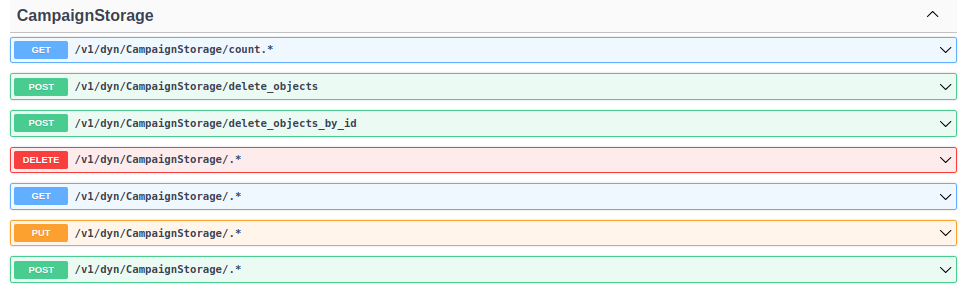
Retrieve Object Count
GET /count.*
Returns the number of objects in the storage.
Delete a Group of Objects by Criteria
POST /delete_objects
Deletes a group of objects based on flexible criteria.
Delete a Group of Objects by Primary Key
POST /delete_objects_by_id
Deletes a group of objects based on primary key values.
Note: This method only supports working with primary parameters.
Delete an Object by Identifier
DELETE /.*
Deletes an object from storage.
Retrieve an Object from Storage
GET /.*
Returns an object from storage.
Modify an Object by Primary Key
PUT /.*
Modifies an object in the database by identifier.
Add/Modify an Object
POST /.*
Adds or modifies an object in the database.
To view them, click on the method tab, and a window will open displaying the available parameters for this method and this storage:
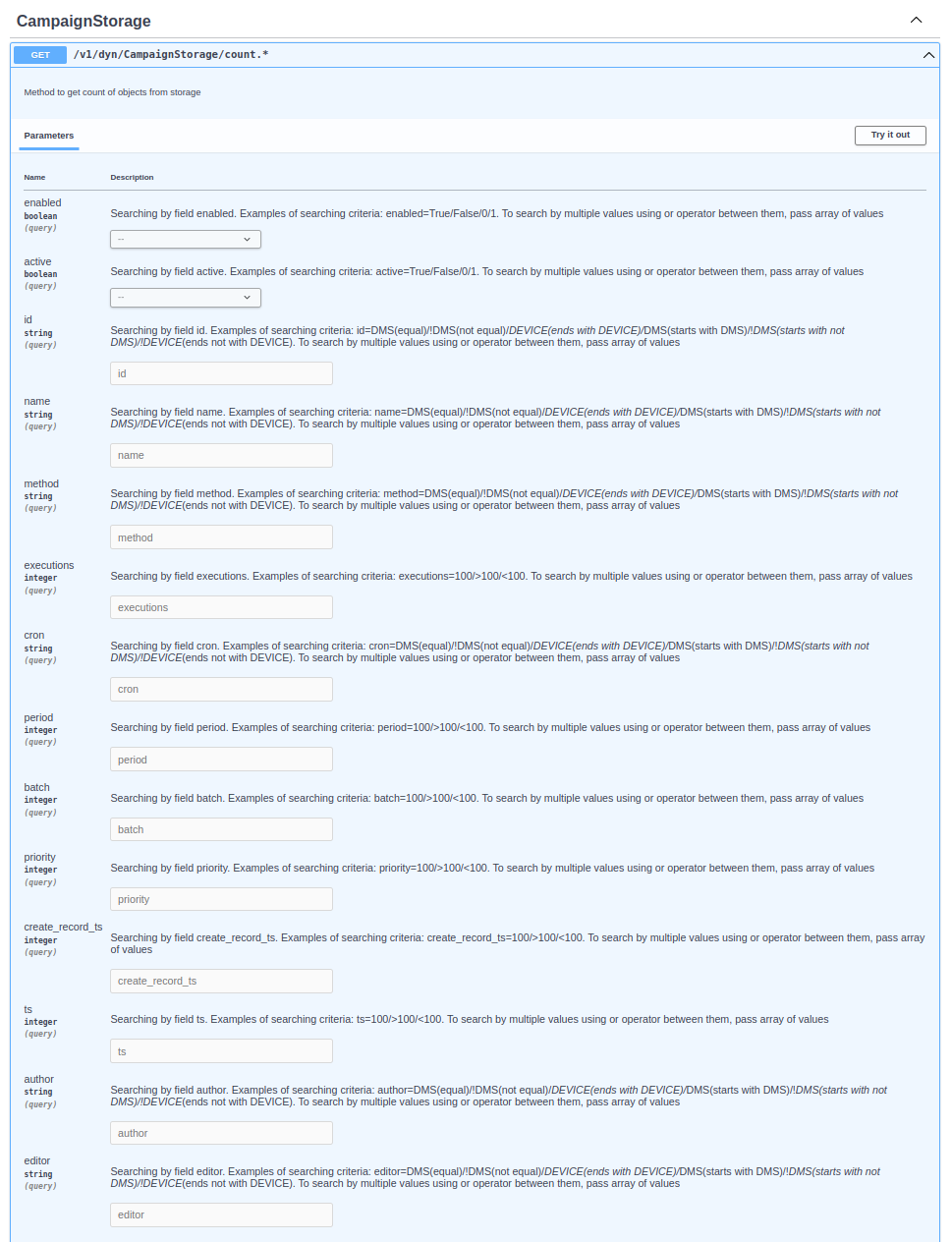
Storage-Specific Parameters
AuthStorage
| Parameter | Primary parameter | Type | Description |
|---|---|---|---|
| id | ✅ | string | Unique identifier of the user |
| username | string | Name of the user | |
| password | string | Password of the user | |
| claims | json | Reserved field for user description | |
| roles | string | Permission identifiers that define access to different parts of the platform | |
| access_path | string | User group name to restrict interaction to specific CPEs, if the corresponding CPE object has the field set | |
| create_record_ts | integer | Time of user creation | |
| ts | integer | Time of the last update to the user record | |
| author | string | Name of the author who created the user record | |
| editor | string | Name of the last user who edited the user record |
Interaction with this table is also possible through the UI in the Admin Portal (Refer to the Users).
CampaignResultStorage
| Parameter | Primary parameter | Type | Description |
|---|---|---|---|
| id | ✅ | string | Unique identifier of the campaign result record |
| exit_code | integer | Campaign exit code | |
| campaignid | string | Unique campaign identifier | |
| ts | integer | Campaign execution time | |
| cpeid | string | Unique CPE identifier | |
| result | json | Campaign execution result |
Interaction with this table is also possible through the UI in the Admin Portal (Refer to the Campaigns Results).
CampaignStorage
| Parameter | Primary parameter | Type | Description |
|---|---|---|---|
| enabled | boolean | Campaign status (Enabled/Disabled) (True/False) | |
| active | boolean | Whether to initiate a CPE session by sending a connection request (True/False) | |
| id | ✅ | string | Unique campaign identifier |
| name | string | Campaign name | |
| events | list | CPE filter for the campaign based on session event. An empty value means "all" | |
| method | string | Scenario that will be called as part of the campaign | |
| args | json | List of parameters to be passed as input arguments for the scenario executing | |
| executions | integer | Number of executions on each CPE device | |
| cron | string | Cron expression describing the campaign execution schedule (see example below) | |
| period | integer | Campaign activation interval in seconds | |
| batch | integer | Number of CPE devices executed in parallel per activation period | |
| priority | integer | Priority determines the execution order of the campaign on CPE. A lower value means a higher priority | |
| create_record_ts | integer | Time of campaign creation | |
| ts | integer | Time of the last update to the campaign | |
| author | string | Name of the campaign author | |
| editor | string | Name of the last user who edited the campaign |
Interaction with this table is also possible through the UI in the Admin Portal (Refer to the Campaigns).
ConfigTemplateStorage
| Parameter | Primary parameter | Type | Description |
|---|---|---|---|
| id | ✅ | string | Unique configuration template identifier |
| name | string | Configuration template name | |
| path | string | Configuration location | |
| parent | string | Template location hierarchy | |
| version | string | Configuration version | |
| enable | boolean | Configuration template status | |
| vendor | string | CPE device manufacturer | |
| model | string | CPE device model | |
| hv | string | CPE device hardware version | |
| sv | string | CPE device software version | |
| content_type | string | Configuration type (Text/Binary) | |
| content | blob | Configuration content | |
| created | integer | Configuration template creation time | |
| edited | integer | Last configuration template update time | |
| author | string | Configuration template author | |
| editor | string | Last person who edited the configuration template |
CpeDbService
| Parameter | Primary parameter | Type | Description |
|---|---|---|---|
| state | integer | CPE device status (see the table below) | |
| cpeid | ✅ | string | Unique identifier for the CPE device |
| type | string | CPE device protocol version | |
| location | string | CPE device location (see the section Setting Set up CPE location) | |
| access_path | string | Identifier that restricts access to the CPE for users not part of the allowed group | |
| datamodel | string | Data model of the CPE device (TR098/TR181) | |
| vendor | string | CPE device manufacturer | |
| model | string | CPE device model | |
| mac | string | MAC address of the CPE device | |
| hw | string | Hardware version of the CPE device | |
| sw | string | Software version of the CPE device | |
| ip | string | IP address of the CPE device | |
| ip2 | string | Secondary IP address of the CPE device | |
| ip3 | string | Tertiary IP address of the CPE device | |
| upstream | string | Serial number of the device at a higher hierarchy level in the network structure | |
| protocol | string | Protocol of the CPE device | |
| firstseen | integer | Time of the first interaction of the CPE device with the ACS | |
| lastseen | integer | Time of the last interaction of the CPE device with the ACS | |
| ts | integer | Time of the last record update | |
| params | json | Cached "name-value" pairs of parameters from the CPE device data model | |
| customparams | json | Custom parameters associated with the CPE device | |
| events | json | List of protocol and system events from the last CPE device session | |
| info | string | Reserved field for user information about the CPE device | |
| tags | list | Reserved field for tagging the CPE device | |
| customtags | list | Reserved field for custom tagging of the CPE device | |
| device_classes | list | Reserved field for CPE device classes | |
| cid | string | Custom identifier for the CPE device | |
| cid2 | string | Secondary custom identifier for the CPE device | |
| cid3 | string | Tertiary custom identifier for the CPE device | |
| imsi | string | IMSI identifier for the CPE device | |
| imei | string | IMEI identifier for the CPE device | |
| msisdn | string | MSISDN identifier for the CPE device |
Interaction with this table is also possible through the UI in the Admin Portal (Refer to the CPE Device).
CPE Device Status Table
| Value | Description |
|---|---|
| 0 | Information received |
| 1 | Connection request sent |
| 2 | CPE initialization |
| 3 | New CPE |
| 4 | Waiting for CPE session |
| 5 | CPE unavailable (missed periodic inform interval) |
| 6 | CPE unavailable (CNR timeout) |
| 7 | CPE error |
| 8 | Software update |
| 9 | CPE reboot |
| 10 | Unauthenticated request |
FirmwareResultStorage
| Parameter | Primary parameter | Type | Description |
|---|---|---|---|
| id | ✅ | string | Unique identifier of the firmware update result record |
| status | boolean | Status of the firmware update procedure | |
| ts | integer | Time of the firmware update procedure execution | |
| cpeid | string | Unique identifier of the CPE device | |
| rule_description | string | Description of the firmware update rule | |
| campaignid | string | Unique identifier of the firmware update rule | |
| result | json | Result of the firmware update procedure |
Interaction with this table is also possible through the UI in the Admin Portal (Refer to the Upgrade Results).
FirmwareStorage
| Parameter | Primary parameter | Type | Description |
|---|---|---|---|
| id | ✅ | string | Unique identifier of the firmware update rule record |
| enabled | boolean | Status of the firmware update rule (Enabled/Disabled) | |
| automatic | boolean | To activate the firmware update rule, enable this option. If enabled, any CPE device that connects to the ACS and matches the update rule will be updated | |
| description | string | Description of the firmware update rule | |
| file | string | Link to the firmware (only the file name for firmware files uploaded to the ACS file server, or the full URL for software files hosted on an external file server) | |
| create_record_ts | integer | Record creation time | |
| ts | integer | Time of the last update | |
| condition | json | CPE criteria (condition for applying the firmware rule) | |
| executions | integer | Number of executions on each CPE device | |
| priority | integer | Priority of the rule (a higher number indicates a higher priority) | |
| author | string | Name of the author of the firmware record | |
| editor | string | Name of the last editor of the firmware record |
Interaction with this table is also possible through the UI in the Admin Portal (Refer to the Firmwares).
ScenarioHistoryStorage
| Parameter | Primary parameter | Type | Description |
|---|---|---|---|
| id | ✅ | string | Unique identifier of the scenario execution record |
| exit_code | integer | Exit code of the scenario execution | |
| ts | integer | Record creation time | |
| start_ts | integer | Time when the scenario execution was initiated | |
| end_ts | integer | Time when the scenario execution was completed | |
| cpeid | string | Unique identifier of the CPE device | |
| scenario | string | Name of the scenario | |
| initargs | json | List of parameters passed as input arguments for scenario execution | |
| author | string | User or service that initiated the scenario execution |
Interaction with this table is also possible through the UI in the Admin Portal (Refer to the Scenario History).
Campaign Storage Usage Example
Examples of interaction are provided for the Campaign Storage service; for other storage services, the interaction is carried out in the same manner.
GET /count.*
Request:
curl -X 'GET' \
  'http://127.0.0.1/v1/dyn/CampaignStorage/count.*?author=admin' \
  -H 'accept: application/json'
Response:
{
  "code": 200,
  "message": "response from CampaignStorage",
  "details": 2
}
POST /delete_objects
Request:
curl -X 'POST' \
  'http://127.0.0.1/v1/dyn/CampaignStorage/delete_objects' \
  -H 'accept: application/json' \
  -H 'Content-Type: application/json' \
  -d '{
  "conditions": {
    "period": "120"
  },
  "batch_size": 10000,
  "return_deleted_records": true,
  "return_fields_of_deleted_records": []
}'
Response:
{
  "code": 200,
  "message": "response from CampaignStorage",
  "details": {
    "data": {
      "deleted_objects_number": 2,
      "deleted_records": [
        {
          "id": "",
          "enabled": false,
          "active": true,
          "name": "Get GPV",
          "condition": {
            "cpeid": "DMS*"
          },
          "events": [
            "2 PERIODIC"
          ],
          "method": "CWMP.GetParameterValues",
          "args": [
            "InternetGatewayDevice.ManagementServer."
          ],
          "executions": 1,
          "cron": "",
          "period": 120,
          "batch": 100,
          "priority": 2,
          "create_record_ts": 0,
          "ts": 0,
          "author": "operator",
          "editor": ""
        },
        {
          "id": "30ca067a-0126-47cf-884b-3796b6eed02c",
          "enabled": false,
          "active": false,
          "name": "GET GPN",
          "condition": {
            "cpeid": "DMS*"
          },
          "events": [
            "0 BOOTSTRAP"
          ],
          "method": "CWMP.GetParameterValues",
          "args": [
            "InternetGatewayDevice.ManagementServer."
          ],
          "executions": 1,
          "cron": "* * * * *",
          "period": 120,
          "batch": 100,
          "priority": 2,
          "create_record_ts": 1742377312,
          "ts": 1742378123,
          "author": "operator",
          "editor": "operator"
        }
      ]
    },
    "detail": "objects deleted successfully",
    "code": 200
  }
}
POST /delete_objects_by_id
Request:
curl -X 'POST' \
  'http://127.0.0.1/v1/dyn/CampaignStorage/delete_objects_by_id' \
  -H 'accept: application/json' \
  -H 'Content-Type: application/json' \
  -d '{
  "pr_key_column": "id",
  "pr_key_values": [
    "54ab83b7-185c-48e7-ab9c-b63b101712c4",
    "9d7aee15-7a27-46af-8c0d-fde567f41b09",
    "f2be7d50-84c4-4ff4-95d9-695c7b4c8a49"
  ],
  "batch_size": 10000,
  "return_deleted_records": true,
  "return_fields_of_deleted_records": []
}'
Response:
{
  "code": 200,
  "message": "response from CampaignStorage",
  "details": {
    "data": {
      "deleted_objects_number": 3,
      "failed_delete_objects_number": 0,
      "deleted_records": [
        {
          "enabled": false,
          "active": true,
          "id": "f2be7d50-84c4-4ff4-95d9-695c7b4c8a49",
          "name": "Get GPV4",
          "condition": {
            "cpeid": "DMS*"
          },
          "events": [
            "2 PERIODIC"
          ],
          "method": "CWMP.GetParameterValues",
          "args": [
            "InternetGatewayDevice.ManagementServer."
          ],
          "executions": 1,
          "cron": "",
          "period": 120,
          "batch": 100,
          "priority": 2,
          "create_record_ts": 1742381747,
          "ts": 1742381747,
          "author": "operator",
          "editor": ""
        },
        {
          "enabled": false,
          "active": true,
          "id": "54ab83b7-185c-48e7-ab9c-b63b101712c4",
          "name": "Get GPV6",
          "condition": {
            "cpeid": "DMS*"
          },
          "events": [
            "2 PERIODIC"
          ],
          "method": "CWMP.GetParameterValues",
          "args": [
            "InternetGatewayDevice.ManagementServer."
          ],
          "executions": 1,
          "cron": "",
          "period": 120,
          "batch": 100,
          "priority": 2,
          "create_record_ts": 1742381753,
          "ts": 1742381753,
          "author": "operator",
          "editor": ""
        },
        {
          "enabled": false,
          "active": true,
          "id": "9d7aee15-7a27-46af-8c0d-fde567f41b09",
          "name": "Get GPV7",
          "condition": {
            "cpeid": "DMS*"
          },
          "events": [
            "2 PERIODIC"
          ],
          "method": "CWMP.GetParameterValues",
          "args": [
            "InternetGatewayDevice.ManagementServer."
          ],
          "executions": 1,
          "cron": "",
          "period": 120,
          "batch": 100,
          "priority": 2,
          "create_record_ts": 1742381757,
          "ts": 1742381757,
          "author": "operator",
          "editor": ""
        }
      ]
    },
    "message": "objects deleted successfully",
    "code": 200
  }
}
DELETE /.*
Request:
curl -X 'DELETE' \
  'http://127.0.0.1/v1/dyn/CampaignStorage/.*?id=a715cc01-4679-4e6e-9146-71eeee0713f2' \
  -H 'accept: application/json'
Response:
{
  "code": 204,
  "message": "response from CampaignStorage",
  "details": ""
}
GET /.*
Request:
curl -X 'GET' \
  'http://127.0.0.1/v1/dyn/CampaignStorage/.*?limit=10000&author=admin' \
  -H 'accept: application/json'
Response:
{
  "code": 200,
  "message": "response from CampaignStorage",
  "details": [
    {
      "enabled": true,
      "active": true,
      "id": "de352cab-068b-4632-a4ec-4d2752ec2ea4",
      "name": "Get GPV",
      "condition": {},
      "events": [],
      "method": "CWMP.GetParameterNames",
      "args": {
        "NextLevel": true,
        "ParameterPath": "InternetGatewayDevice."
      },
      "executions": 1,
      "cron": "* * * * *",
      "period": 60,
      "batch": 100,
      "priority": 5,
      "create_record_ts": 1742374787,
      "ts": 1742374787,
      "author": "admin",
      "editor": ""
    },
    {
      "enabled": false,
      "active": true,
      "id": "8409b4f2-e818-4053-8e6b-8c75f82ef299",
      "name": "Activate WIFI",
      "condition": {},
      "events": [
        "2 PERIODIC"
      ],
      "method": "Campaigns.ActivateWiFi",
      "args": {},
      "executions": 1,
      "cron": "* * * * *",
      "period": 60,
      "batch": 100,
      "priority": 5,
      "create_record_ts": 1742374680,
      "ts": 1742374805,
      "author": "admin",
      "editor": "admin"
    }
  ]
}
PUT /.*
Request:
curl -X 'PUT' \
  'http://127.0.0.1/v1/dyn/CampaignStorage/.*?id=30ca067a-0126-47cf-884b-3796b6eed02c' \
  -H 'accept: application/json' \
  -H 'Content-Type: application/json' \
  -d '{
  "enabled": false,
  "active": false,
  "id": "30ca067a-0126-47cf-884b-3796b6eed02c",
  "name": "GET GPN",
  "condition": {
   "cpeid": "DMS*"
  },
  "events": [
    "0 BOOTSTRAP"
  ],
  "method": "CWMP.GetParameterValues",
  "args": [
   "InternetGatewayDevice.ManagementServer."
  ],
  "executions": 1,
  "cron": "* * * * *",
  "period": 120,
  "batch": 100,
  "priority": 2,
  "author": "operator",
  "editor": "operator"
}'
Response:
{
  "code": 204,
  "message": "response from CampaignStorage",
  "details": ""
}
POST /.*
Request:
url -X 'POST' \
  'http://127.0.0.1/v1/dyn/CampaignStorage/.*' \
  -H 'accept: application/json' \
  -H 'Content-Type: application/json' \
  -d '{
  "enabled": false,
  "active": true,
  "id": "1560ed5c-172e-4b93-91cf-ba0d4708d997",
  "name": "Get GPV",
  "condition": {
  "cpeid": "DMS*"
  },
  "events": [
    "2 PERIODIC"
  ],
  "method": "CWMP.GetParameterValues",
  "args": [
   "InternetGatewayDevice.ManagementServer."
  ],
  "executions": 1,
  "cron": "",
  "period": 120,
  "batch": 100,
  "priority": 2,
  "create_record_ts": 1742374680,
  "ts": 1742374680,
  "author": "operator",
  "editor": ""
}'
Note: If the request does not contain the fields "id", "create_record_ts", and "ts", their values will be generated automatically.
Response:
{
  "code": 204,
  "message": "response from CampaignStorage",
  "details": ""
}
Multiple RPC: POST /.*
Example of requesting multiple RPC methods
Request:
url -X 'POST' \
  'http://localhost/v1/dyn/CampaignStorage/.*' \
  -H 'accept: application/json' \
  -H 'Content-Type: application/json' \
  -d '{
  "enabled": false,
  "active": true,
  "id": "fdabb9a9-cde6-4f0c-95d3-b5f00c5750ad",
  "name": " Get RPC and GPV",
  "condition": {
    "cpeid": "DMS_DEVICE"
  },
  "events": [],
  "method": "Custom",
  "args": [
    {
      "args": {},
      "method": "CWMP.GetRPCMethods"
    },
    {
      "args": [
        "InternetGatewayDevice.ManagementServer.URL"
      ],
      "method": "CWMP.GetParameterValues"
    }
  ],
  "executions": 0,
  "cron": "",
  "period": 60,
  "batch": 100,
  "priority": 5,
  "create_record_ts": 1752744400,
  "ts": 1752744400,
  "author": "admin",
  "editor": ""
}'
Response:
{
  "code": 204,
  "message": "response from CampaignStorage",
  "details": ""
}
Campaign Result Storage Usage Example
The interaction examples are provided for the Campaign Result Storage service; for other Result services, the interaction is carried out in a similar manner.
GET /count.*
Request:
curl -X 'GET' \
  'http://localhost/v1/dyn/CampaignResultStorage/count.*' \
  -H 'accept: application/json'
Response:
{
  "code": 200,
  "message": "response from CampaignResultStorage",
  "details": 2
}
GET /.*
Example of retrieving data about sessions (campaigns) processed on a CPE with cpeid=DMS"
Request:
curl -X 'GET' \
  'http://localhost/v1/dyn/CampaignResultStorage/.*?limit=10000&cpeid=DMS%2A' \
  -H 'accept: application/json'
Response:
{
  "code": 200,
  "message": "response from CampaignResultStorage",
  "details": [
    {
      "id": "4ba932d6-6d23-45ec-8529-04b390a00386",
      "exit_code": 0,
      "campaignid": "389b799a-5cb3-4e6f-9310-50cc716cb65d",
      "ts": 1752665900,
      "cpeid": "DMS_DEVICE",
      "result": {}
    },
  {
      "id": "824567c9-b68c-417f-b6aa-6aadf61d4bf1",
      "exit_code": 0,
      "campaignid": "aa92a9af-94d4-4f25-bdc9-0b9c5dc53dbf",
      "ts": 1752667951,
      "cpeid": "DMS_DEVICE",
      "result": [
        "GetRPCMethods",
        "SetParameterValues",
        "GetParameterValues",
        "GetParameterNames",
        "SetParameterAttributes",
        "GetParameterAttributes",
        "AddObject",
        "DeleteObject",
        "Reboot",
        "Download"
      ]
    }
  ]
}
POST /delete_objects_by_id
Request:
curl -X 'POST' \
  'http://127.0.0.1/v1/dyn/CampaignResultStorage/delete_objects_by_id' \
  -H 'accept: application/json' \
  -H 'Content-Type: application/json' \
  -d '{
  "pr_key_column": "id",
  "pr_key_values": [
    "result_001",
    "result_002",
    "result_003"
  ],
  "batch_size": 1000,
  "return_deleted_records": true,
  "return_fields_of_deleted_records": ["id", "campaignid", "cpeid", "exit_code"]
}'
Response:
{
  "code": 200,
  "message": "response from CampaignResultStorage",
  "details": {
    "data": {
      "deleted_objects_number": 3,
      "failed_delete_objects_number": 0,
      "deleted_records": [
        {
          "id": "result_001",
          "campaignid": "campaign_123",
          "cpeid": "DMS_001",
          "exit_code": 0
        },
        {
          "id": "result_002",
          "campaignid": "campaign_123",
          "cpeid": "DMS_002",
          "exit_code": 1
        },
        {
          "id": "result_003",
          "campaignid": "campaign_456",
          "cpeid": "DMS_003",
          "exit_code": 0
        }
      ]
    },
    "message": "objects deleted successfully",
    "code": 200
  }
}
POST /delete_objects
Request:
curl -X 'POST' \
  'http://localhost/v1/dyn/CampaignResultStorage/delete_objects' \
  -H 'accept: application/json' \
  -H 'Content-Type: application/json' \
  -d '{
  "conditions": {
    "exit_code": 1
  },
  "batch_size": 1000,
  "return_deleted_records": true,
  "return_fields_of_deleted_records": ["id", "exit_code", "campaignid", "cpeid", "ts"]
}'
Response:
{
  "code": 200,
  "message": "response from CampaignResultStorage",
  "details": {
    "data": {
      "deleted_objects_number": 2,
      "deleted_records": [
        {
          "id": "result_old_001",
          "exit_code": 1,
          "campaignid": "old_campaign_001",
          "cpeid": "DMS_001",
          "ts": 1741999800
        },
        {
          "id": "result_old_002",
          "exit_code": 1,
          "campaignid": "old_campaign_002",
          "cpeid": "DMS_002",
          "ts": 1741999500
        }
      ]
    },
    "detail": "objects deleted successfully",
    "code": 200
  }
}